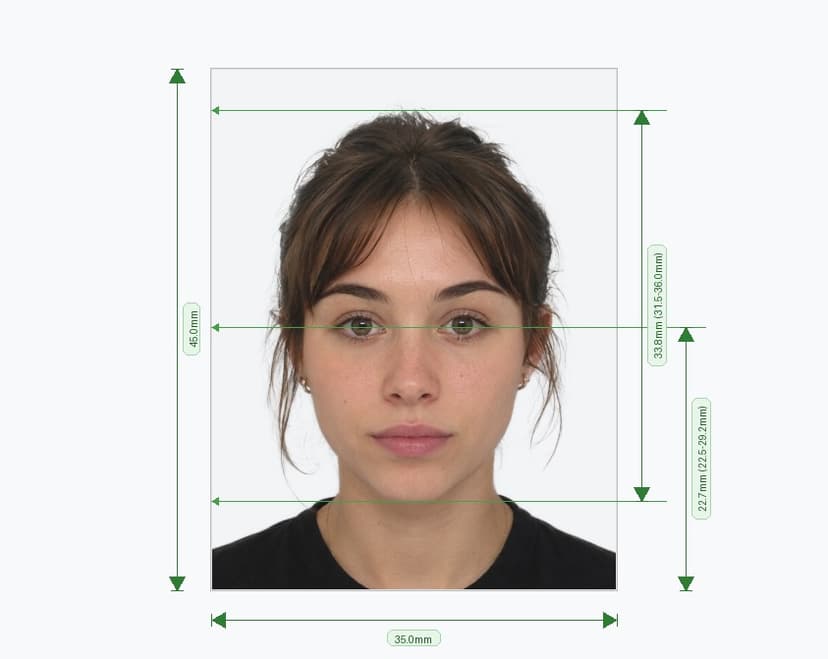
New Zealand Passport Photo Rules What the DIA Requires
The Department of Internal Affairs (DIA) does not accept photos that break its standards, and that delays your passport. Upload a clear portrait, and our tool crops it, sizes it, and checks it against the DIA specifications. You get a New Zealand passport photo that is ready to print for a paper application or upload for an online one.
New Zealand Passport Photo Specifications 2026
New Zealand Passport Photo Size: Print and Digital Specs
- Print size: 35 mm wide × 45 mm tall. Paper applications need 2 identical colour photos.
- Digital size: 900–4500 pixels wide and 1200–6000 pixels high, in a 3:4 portrait ratio.
- File type and weight: .jpg or .jpeg, between 250KB and 5MB.
- Head size: Your head, including hair, fills 80% of the photo height. Leave a clear gap around the sides and top.
- Photo age: Less than 6 months old.
Our tool exports both formats, so the New Zealand passport photo size is correct whether you apply online or on paper.
How to Make a New Zealand Passport Photo Online
- Take a clear photo. Ask someone else to shoot it. Selfies get rejected.
- Upload it. Our tool crops and resizes your photo to the DIA format.
- Review the preview. Confirm your head, background, and expression meet each rule.
- Download and apply. Upload the JPEG online, or print the A4 sheet for a paper application.
NZ Passport Photo Checker: Test Your Photo Before You Apply
Our NZ passport photo checker reviews your photo's size, head position, contrast, and background in seconds. The DIA also runs a free official tool at onlinephotochecker.passports.govt.nz. Run your photo through our NZ passport photo checker first, then confirm it with the DIA tool before you submit.
New Zealand Passport Photo Check: Five Quick Points
- Format: 3:4 portrait, JPEG, within the pixel and file size limits.
- Framing: Head centred, with your shoulders and upper chest in the frame.
- Background: Plain and light, with strong contrast and no shadows.
- Face: Neutral expression, mouth closed, eyes open.
- Date: Taken within the last 6 months.
A New Zealand passport photo check takes under a minute and spares you a delayed application.
Common Reasons a New Zealand Passport Photo Gets Rejected
Follow these New Zealand passport photo rules and avoid a delay:
- Background: Use a plain, light background, but not white. Stand at least 0.5 m in front of it so your head casts no shadow.
- Camera distance: Ask a friend to stand 1.5 m away and hold the camera at your eye level. A close-up distorts your face.
- Face position: Face the camera straight on. Keep your head upright and your hair out of your eyes.
- Expression: Keep a neutral expression. Do not smile or frown.
- Glasses: Prescription glasses are fine if the lenses are not tinted and the frames are not thick. Leave a clear gap between your eyes and the frames, and avoid glare. Sunglasses are not allowed.
- Head coverings: Wear one only for religious or medical reasons, and keep your face fully visible.
- Edits: Do not apply filters or use AI tools to change how you look. The DIA wants your natural appearance.
- Scans: Do not upload a scan of a printed photo. The DIA does not accept scans.
Baby and Child Photos
Lay your baby on a plain, light-coloured sheet and shoot from above. Show the baby's entire face with both eyes open. Keep other people and objects out of the frame.
Passport Photos Christchurch: Print Locally
Living in Canterbury? Create your photo online, then print it at a pharmacy, a Warehouse Stationery store, or a professional photographer near you. For a paper application, follow the DIA print rules:
- Print 2 identical colour photos at 35 x 45 mm.
- Use high-quality photo paper. Do not use matte paper, heavy-backed thermal paper, or an inkjet printer.
- Write your full name and the date on the back of one photo.
- Do not staple, glue, or paper-clip the photos to your form.
Why Photo Quality Matters
The DIA uses facial recognition on application photos to protect your identity and match your records. A sharp, natural, front-facing photo with no filters gives the software, and the officer reviewing your file, a clear view of your face.
Passport Photo FAQ for New Zealand Applicants
Can I take a New Zealand passport photo with my phone?
Yes. Ask someone else to take it from 1.5 m away at your eye level. Then upload it to our tool for cropping, sizing, and checking.
Can I use a white background?
No. The DIA requires a plain, light background, but not white. Keep strong contrast between your face and the background.
Does the NZ passport photo checker guarantee approval?
No tool can guarantee approval, because the DIA makes the final decision. Our checker catches the common errors, and the free DIA tool gives you a second confirmation.
Where can I print passport photos Christchurch shops accept?
Take your file to a pharmacy, a Warehouse Stationery store, or a professional photographer. Ask for high-quality photo paper, and avoid inkjet and matte prints.
How recent must my photo be?
Your photo must be less than 6 months old.
Get Your Photo Ready in Minutes
Create your New Zealand passport photo now, run the checker, and apply with confidence.