Make an Australian Passport Photo Online — Compliant With APO Rules
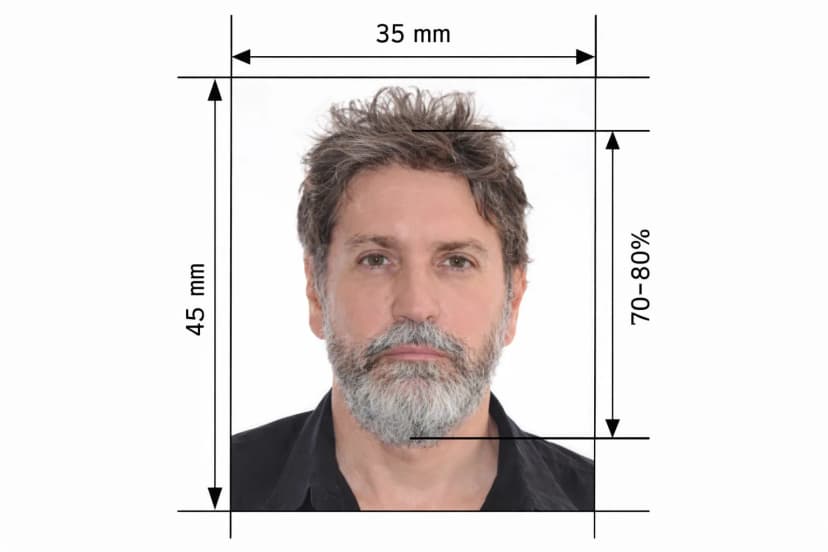
The Australian Passport Office (APO), part of the Department of Foreign Affairs and Trade, checks every application photo against a strict set of measurements before it reaches biometric processing at SmartGate. Getting the australian passport photo requirements wrong — the wrong crop, a shadow on the background, glasses left on — is one of the most common reasons applications stall. This tool takes a photo you upload from your phone or camera and checks it against the exact APO specification: size, face height, and background, so you know precisely where your photo stands before you print or submit anything.
Australian Passport — Technical Specifications
How This Tool Helps You Get It Right
Full Specification Table
Every measurement below matches the official APO photo guidelines published at passports.gov.au — the same standard this tool checks your photo against.
| Requirement | Official Specification |
|---|---|
| Photo dimensions | 35 mm wide × 45 mm tall |
| Face height (chin to crown) | 32 mm – 36 mm |
| Background | Plain white or light-coloured, uniform, no patterns or shadows |
| Photo recency | Taken within the last 6 months |
| Digital file format | JPEG, minimum 413 × 531 pixels at 300 DPI |
| Print quality | High-gloss, heavy-weight photo paper; inkjet prints not accepted |
| Expression | Neutral, mouth closed, eyes open — required for anyone over 3 years old |
| Glasses | Must be removed; medical exceptions require supporting documentation |
| Head coverings | Not permitted except for verified religious or medical reasons |
| Editing | Unedited — no background removal, skin smoothing, or red-eye correction |
What This Tool Checks — and What Stays Up to You
Face Height: The 32–36 mm Rule
Your face, measured from the bottom of your chin to the top of your crown, must fall between 32 mm and 36 mm. This is the single most commonly failed measurement in Australian passport photos, usually because the subject is positioned too far away or too low in the frame. The tool detects your facial landmarks automatically and shows you exactly where your current photo sits against this range, so you can reposition and retake before wasting a print.
Background: Plain White, No Shadows
The background must be plain white or light-coloured, completely uniform, with no patterns, gradients, or shadows. A shadow cast behind the subject is one of the most common reasons APO rejects a photo. The tool flags visible shadow or unevenness in your background so you can retake against a cleaner wall — because per official APO guidance, the final submitted photo must remain unedited, so background correction happens by retaking the shot, not by digital replacement.
Glasses: Removed for All Applicants
The APO requires all glasses to be removed for passport photos, including prescription and reading glasses. The only exception is a verified medical condition, and even then, supporting documentation must accompany the application. Vision impairment alone isn't an accepted reason — contact lenses are the recommended alternative. Sunglasses, tinted lenses, and transition lenses are never acceptable.
Expression and Pose
For anyone aged 3 and over, the APO requires a neutral expression: mouth closed, eyes open, looking directly at the camera. Your head must stay straight, not tilted or turned, with shoulders square to the camera. Per official APO guidance, don't trim an oversized photo yourself — take a fresh one instead. The tool checks your framing against the required proportions so you know before printing whether a retake is needed.
Why the Final Photo Must Stay Unedited
The APO explicitly requires photos to be clear, unedited, and printed on high-gloss, heavy-weight paper. Even minor digital edits — background replacement, mole removal, skin-smoothing — can affect biometric matching and trigger rejection. That's why this tool works as a measurement and compliance checker rather than an image editor: it tells you precisely how your original photo measures up against the 35 × 45 mm frame, the 32–36 mm face height, and background uniformity, so any correction happens by retaking the photo under better conditions, not by altering the image.
Compliance Checklist
Before You Submit — Verify Every Point
| Checklist Item | Requirement | Common Mistake |
|---|---|---|
| Photo dimensions | Exactly 35 × 45 mm | Using US 2×2 inch or Canadian 50×70 mm format |
| Face height | 32–36 mm chin to crown | Subject too small or too close in frame |
| Background | Plain white, no shadows | Shadow cast behind subject; patterned wall |
| Expression | Neutral, mouth closed, eyes open | Slight smile or squinting eyes |
| Glasses | Removed for all applicants | Keeping prescription glasses on |
| Head position | Straight, facing camera directly | Slight tilt or rotation |
| Photo age | Taken within last 6 months | Using an older photo that still 'looks like you' |
| Editing | No digital edits of any kind | Background replaced or skin retouched |
| Print quality | High-gloss photo paper only | Inkjet home printer output |
Renewal, Online Applications, and Print Templates
If you're applying for an australian passport photo for renewal through the online portal, the digital file must be a JPEG at a minimum of 413 × 531 pixels (300 DPI). This tool exports a correctly sized file so you can check your framing and measurements before your professional print, and provides an A4 template with four correctly proportioned 35 × 45 mm placements, ready for high-gloss printing at a photo shop.
A Note on Photo Apps and the APO
The Australian Passport Office's official guidance states it does not recommend using an online passport photo service or mobile app to generate your final submitted photo, since edited images can raise identity-fraud concerns. This tool is built around that guidance: it measures and checks your unedited photo against the official specification rather than digitally altering it, so you always know exactly how your real photo — printed on high-gloss paper as required — compares to the APO standard before you submit.
Frequently Asked Questions
Can I create an australian passport photo online and use it directly? You can use this tool to check your framing, face height, and background against APO requirements, then print the compliant, unedited photo on high-gloss paper as APO requires.
Can I take an australian passport photo at home? Yes — a plain white wall, even daylight or diffuse indoor lighting, and a phone camera are enough, provided the final measurements match the 35 × 45 mm and 32–36 mm face-height requirements.
What if my photo fails the check? Adjust your distance from the camera or your background and retake — there's no limit on how many times you can check a new photo.
Does this replace professional printing? No. The APO requires high-gloss, heavy-weight paper for the final print, so use this tool to verify compliance, then print at a professional service or approved retailer.
Upload your photo, get an instant compliance check against every APO measurement, and print with confidence the first time.