US Visa Photo Maker: Get a CEAC-Ready Photo in Seconds
Upload any photo, and this tool turns it into a fully compliant photo visa usa file in under a minute — correctly sized, cropped, and background-corrected for the DS-160, DS-260, and Diversity Visa Lottery. No photo studio visit, no manual cropping, no guessing whether your photo for american visa upload will pass. This page works as both an american visa photo checker and a photo generator, so you can verify an existing photo or create a new one from scratch.
How the US Visa Photo Checker Works
- Step 1 — Upload: Choose any clear photo of your face, taken within the last 6 months.
- Step 2 — Auto-crop and correct: The tool detects your face, resizes the head to the correct proportion, centers the eyeline, and swaps the background for pure white.
- Step 3 — Download: Get a 600 x 600 pixel JPEG under 240 KB, ready to upload directly to CEAC, plus a printable 2x2 inch version if you need a physical copy.
This removes the two steps that cause most rejections: manual background editing and manual cropping. You get a passport photo for us visa that matches the exact government spec on the first attempt.
US Visa Photo Size Specifications
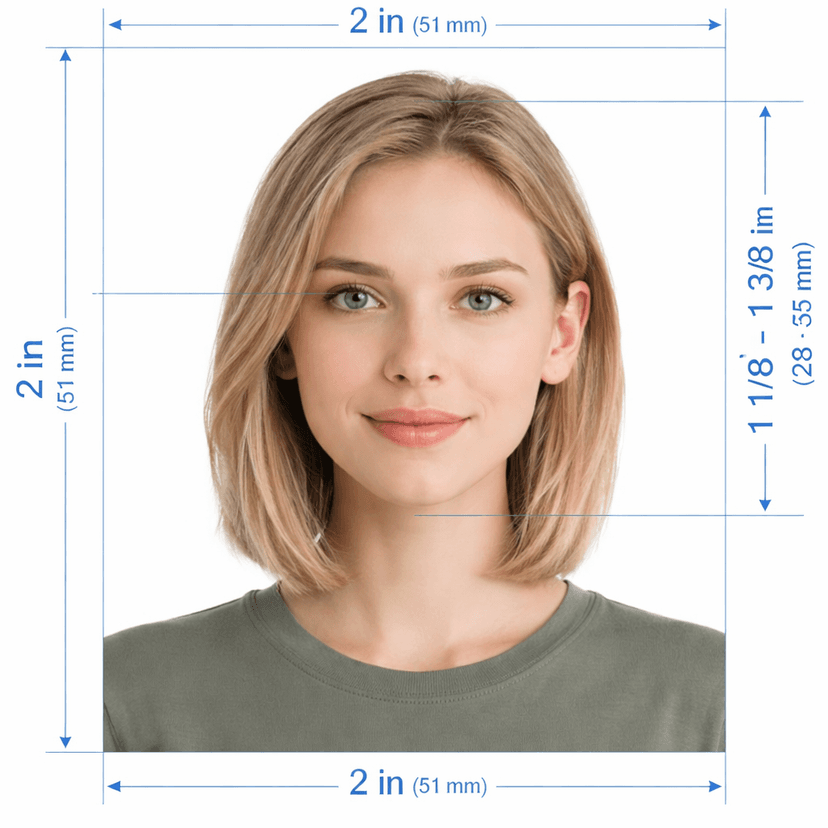
This tool builds every photo to the exact standard the State Department requires — the same spec used for a us passport visa photo, an american visa passport photo, or a us diversity visa photo.
| Requirement | Standard |
|---|---|
| Digital dimensions | 600 x 600 pixels |
| Print dimensions | 2 x 2 inches (51 x 51 mm) |
| File format | JPEG (.jpg) |
| Maximum file size | 240 KB |
| Color mode | 24-bit sRGB, full color (no grayscale) |
| Background | Plain white, no shadows or texture |
| Head height | 50% to 69% of image height |
| Eye height | 56% to 69% of image height from the bottom edge |
What the Tool Fixes Automatically
- Background replacement: Removes any wall, curtain, or shadow and replaces it with pure white, the top cause of manual rejection.
- Head and eye alignment: Repositions your face so head size and eyeline both sit inside the required range, without you measuring anything.
- Smart compression: Compresses the file to stay under 240 KB while keeping enough sharpness to pass biometric review — a balance that's hard to get right by hand.
- Color and metadata check: Confirms the file is true sRGB color and strips unnecessary EXIF data that can block CEAC uploads.
Why Use This Tool Instead of a Photo Studio
Searching us visa photos near me or american visa photo near me usually means a trip out, a wait in line, and a per-print fee — with no guarantee the studio gets the CEAC digital spec exactly right. This tool gives you the same result from your phone or laptop.
| This Tool | Local Photo Studio | |
|---|---|---|
| Turnaround | Under 1 minute | Same-day, in person |
| Digital file for CEAC upload | Included automatically | Often needs a separate request |
| Retakes if you're not happy | Unlimited, instant | Extra visit or fee |
| Cost | Low, one-time | Studio pricing varies |
Works for Every US Visa Photo Type
One correctly formatted photo covers every use case below, since the State Department applies a single spec across visa categories.
- DS-160 nonimmigrant visa applications — tourist, student, and work visas, including online nonimmigrant visa application ds 160 photo requirements.
- DS-260 immigrant visa applications.
- Diversity Visa Lottery entries — meets the same rule searched as american lottery visa photo size or us lottery visa photo size.
- US visa interview photo — a fresh printed copy to bring to your consulate appointment.
- US visa biometric photo — matches the format used for biometric data capture at the visa application center.
Dress Code Reminders Before You Upload
The tool corrects background, crop, and sizing, but a few rules depend on how you're photographed, not on editing:
- Remove eyeglasses — they are not permitted under any circumstance.
- Skip uniforms, and avoid clothing that resembles a military, police, or corporate uniform.
- Head coverings are allowed only for religious or medical reasons, and your face must stay fully visible.
- Keep a neutral expression with both eyes open, facing the camera directly.
Common US Visa Photo Rejection Reasons
These are the issues consular officers and the CEAC system flag most often — and exactly what this tool checks before you download your file.
| Rejection Reason | Fixed By This Tool |
|---|---|
| Background not plain white | Yes — automatic background replacement |
| Head too large or too small in frame | Yes — automatic head-size correction |
| Eyes positioned too high or low | Yes — automatic eyeline alignment |
| File size over 240 KB | Yes — smart compression |
| Wrong pixel dimensions | Yes — output locked to 600 x 600 px |
| Wearing glasses | No — retake the photo without glasses |
Frequently Asked Questions
What size photo does a US visa need?
Every photo required for us visa applications must be 600 x 600 pixels for digital upload, or 2 x 2 inches if printed, on a plain white background.
Can I use this as a US visa photo checker before I upload to CEAC?
Yes. Upload your existing photo, and the tool flags size, background, and cropping issues, then generates a corrected version so you avoid a failed CEAC upload attempt.
Does this work for the Diversity Visa Lottery photo too?
Yes, the specification for a us visa pictures submission is identical across the DS-160, DS-260, and DV Lottery, so one photo from this tool covers all three.
Can I get a printed copy as well as the digital file?
Yes. Along with the 600 x 600 pixel JPEG for CEAC, you get a print-ready 2 x 2 inch layout formatted for standard photo paper.
Upload your photo above to generate a compliant US visa photo now — correctly sized, background-corrected, and ready for CEAC in one step.