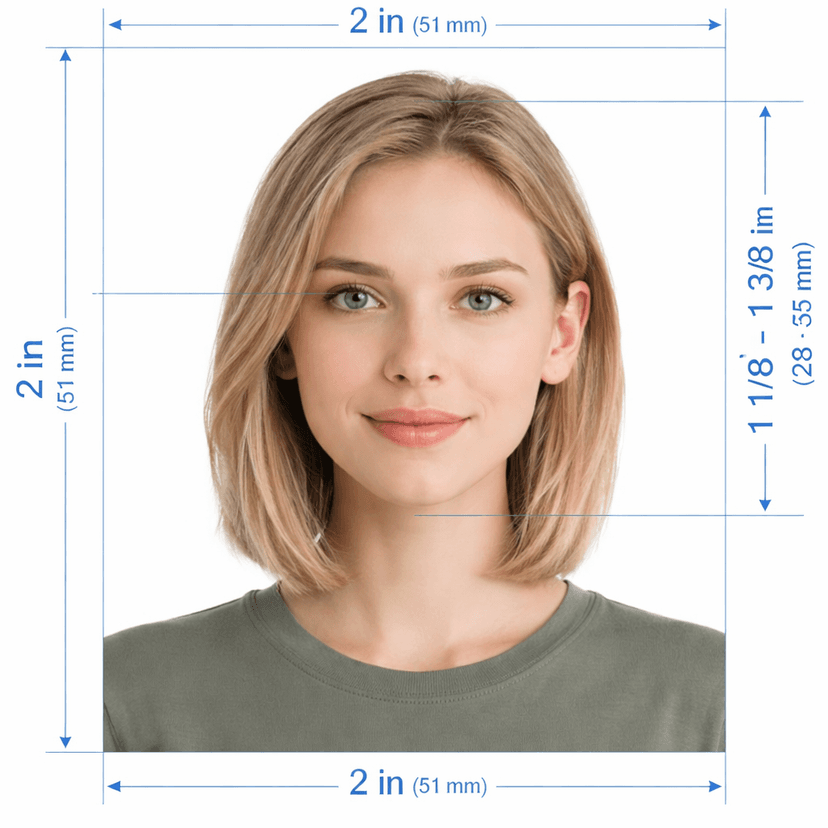
US Passport Photo Checker & 2×2 Maker: Official Sizing & Validation Tool
Getting your us passport photo size right is critical to avoiding application delays or outright rejection by the U.S. Department of State. Whether you are applying for a first-time U.S. passport, renewing by mail with Form DS-82, or filing an online passport renewal, your photo must adhere to strict biometric standards: a precise 2 × 2 inch (51 × 51 mm) print or 600 × 600 pixel digital square on a plain white background. Our us passport photo tool automatically crops, scales, and validates your selfie or portrait against all official Travel.State.Gov specifications, giving you a 2x2 picture size online free preview in seconds.
Official U.S. Passport Photo Specifications & Limits
How Our 2×2 Photo Maker & Checker Works
Traditional photo booths and retail pharmacy counters charge $15 to $22 per pair of prints and frequently fail automated intake scanners due to uneven lighting or improper cropping. Our AI-powered 2x2 photo maker eliminates human error in 3 simple steps:
- Upload Any Portrait or Selfie: Take a photo with your smartphone or upload an existing photo from the last 6 months (JPEG, PNG, or HEIC).
- Automatic Biometric Cropping & Background Replacement: Our software locates your facial landmarks, positions your head within the mandatory 50%–69% zone, aligns your eye level between 56% and 69%, and replaces any background with a compliant, shadow-free solid white backdrop.
- Download Instant Digital & Print Files: Receive a high-resolution 600×600 px JPEG under 240 KB for online renewal uploads, plus a standard 4×6 inch print template containing 4 identical 2×2 inch photos that you can print at Walgreens, CVS, or Walmart for under $0.50.
Why Online Validation Beats DIY Manual Editing
Trying to crop a 2×2 inch photo manually in Photoshop or phone photo editors usually leads to subtle errors that human eyes miss but passport agency automated scanners flag instantly.
| Inspection Point | Manual DIY Editing | Our AI US Passport Tool |
|---|---|---|
| Head Height Calculation | Manual ruler guessing (often misses 50%–69% rule) | Pixel-exact calculation from chin to crown |
| Eye Level Positioning | Estimated visually | Locked precisely between 56% and 69% from bottom |
| Background Uniformity | Often leaves wall texture, cream tint, or shadows | Clean AI removal to 100% compliant solid white |
| File Weight & Color Profile | May exceed 240 KB or export non-sRGB colors | Compressed to ≤240 KB with standard 24-bit sRGB |
| 4×6 Print Sheet Generation | Requires complex grid alignment in photo software | Generates 4 ready-to-cut 2×2 in photos automatically |
Official U.S. Passport Photo Rejection Checklist
According to the U.S. Department of State, photo non-compliance is the single greatest cause of passport application suspension. Before you submit your application, verify your picture against this complete rejection checklist:
- No Eyeglasses: Eyeglasses, sunglasses, and tinted lenses have been completely prohibited since November 1, 2016. Even daily prescription glasses must be removed. Only severe medical exemptions (such as documented recent eye surgery with a signed doctor statement) are considered.
- Neutral Facial Expression: Look directly at the camera with both eyes open and mouth closed. A natural, unexaggerated expression is required; wide open smiles, grimaces, or showing teeth will fail biometric verification.
- Head Size & Proportions: Your head from the bottom of your chin to the top of your hair must measure between 1 inch and 1⅜ inches (50% to 69% of the photo height).
- No Shadows or Uneven Lighting: Lighting must be balanced across your face with no dark shadows cast under the chin, behind ears, or on the white background.
- Proper Attire: Wear everyday casual clothing. Uniforms, camouflage patterns, clothing resembling uniforms, and large jewelry that obscures your neck are not allowed.
- Headgear & Hats: Hats, caps, and headbands are prohibited. Religious head coverings worn daily are permitted only if your full facial oval (from hairline/forehead to chin and ear to ear) remains completely unobstructed with no shadows.
- Photo Recency: The photograph must have been taken within the past 6 months to reflect your current appearance.
- No Digital Filters or AI Alteration: Smoothing skin, removing birthmarks or scars, using social media filters, or digitally altering facial features is strictly banned.
One Unified Specification Across All U.S. Travel Documents
Because the U.S. Department of State applies the exact same 2 × 2 inch (51 × 51 mm) biometric standard across multiple federal agencies, photos generated by this tool are universally accepted for:
- U.S. Passport Books & Cards: Form DS-11 (first-time applicants), Form DS-82 (adult renewal), and Form DS-5504 (name changes and corrections).
- U.S. Visas & DS-160: Tourist (B1/B2), Student (F-1/M-1), Exchange (J-1), and Work (H-1B, L-1, O-1) visa applications submitted through the CEAC portal.
- Diversity Visa Lottery: Electronic Diversity Visa (DV) program entries (DS-5501).
- U.S. Green Card & USCIS Petitions: Form I-485 (Adjustment of Status), Form I-130, Form I-765 (Employment Authorization / EAD), Form I-131, and Form I-90.
- Real ID & State Driver's Licenses: 50-state DMV and Real ID identification cards.
Free Online Preview with Instant Biometric Check
Upload your photo above to test its framing, background, and head proportions for free. Our validator inspects the image in real time against the latest U.S. Department of State rules, ensuring your 2×2 inch photo is 100% submission-ready before you file.
Frequently Asked Questions
What is the official US passport photo size in inches and mm? The physical print size is exactly 2 × 2 inches (51 × 51 mm). For digital submissions, the image must be a square between 600 × 600 pixels and 1200 × 1200 pixels at 300 DPI.
Can I take my US passport photo with a smartphone? Yes. Have someone photograph you from 4 to 6 feet away at eye level in front of a well-lit area. Upload it here, and our tool crops the image to the exact 2×2 inch dimensions and replaces the background with compliant white.
Can I wear prescription glasses in a US passport photo? No. Eyeglasses are strictly prohibited by the U.S. Department of State with zero exceptions for cosmetic or routine prescription wear. You must remove your glasses for the photo.
What is the maximum digital file size for online passport and visa uploads? Digital files uploaded to State Department and CEAC portals must be saved in JPEG format (.jpg) and must not exceed 240 KB in file size with 24-bit sRGB color.
Is an America passport size photo the same as a US visa size photo? Yes. Both U.S. passports and U.S. visas (DS-160/DS-260) follow identical 2 × 2 inch (51 × 51 mm) dimensions, 50%–69% head height ratios, and plain white background requirements.
How can I print my 2×2 passport photo cheaply? Download the 4×6 inch print template provided by our tool. It contains four identical 2×2 inch photos. Upload this 4×6 file as a standard photo print to any pharmacy photo service (CVS, Walgreens, Walmart) for under $0.50.