Australia Visa Photo Tool — Check Your Photo Against DHA Requirements
Australian visa applications — whether a Visitor visa (subclass 600), Student visa (subclass 500), Skilled visa (subclass 189/482), or Partner visa (subclass 820) — are lodged through ImmiAccount, the Department of Home Affairs' official portal. ImmiAccount runs an automated check on every uploaded australia visa photo, and a failed check halts your application until you upload a compliant file. This tool checks your photo against the exact DHA specification — size, face height, background, file size, and resolution — before you upload, so you know it will pass on the first attempt.
Australian Visa — Technical Specifications
How This Tool Works
Full Specification Table
All measurements below are sourced from the Department of Home Affairs' official visa photo guidelines at immi.homeaffairs.gov.au, and this tool checks your upload against each one.
| Requirement | Official Specification |
|---|---|
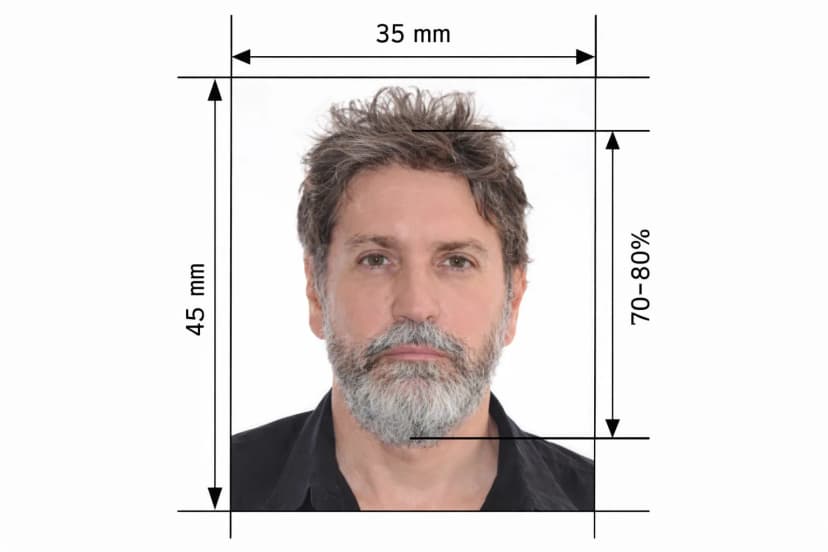
| Photo dimensions (print) | 35 mm wide × 45 mm tall |
| Face height (chin to crown) | 32 mm – 36 mm |
| Background | Plain white or neutral light grey; no patterns, shadows, or objects |
| Photo recency | Taken within the last 6 months |
| Digital format | JPEG (.jpg) only for ImmiAccount uploads |
| Digital file size | 70 KB minimum – 3.5 MB maximum |
| Preferred digital resolution | 1200 × 1600 pixels |
| Colour space | Colour (not black and white); sRGB recommended |
| Expression | Neutral; mouth closed; eyes open and looking at camera |
| Glasses | Permitted only with no glare, no tint, and frames not obscuring eyes |
| Head coverings | Only for verified religious or medical reasons; must not obscure the face |
| Editing | Unedited; no background replacement, filters, or retouching |
What Gets Checked, Point by Point
ImmiAccount Upload Requirements
Your photo must be a JPEG between 70 KB and 3.5 MB, with a preferred resolution of 1200 × 1600 pixels. The DHA advises that a scan of a printed photo, or a phone photo of a photo, is not acceptable — always use the original digital file. This tool checks your file against these exact size and format limits before you attempt the ImmiAccount upload, so a technical rejection never derails your application.
Background: White or Light Grey
Unlike the Australian Passport Office, which requires plain white only, the Department of Home Affairs accepts either a plain white or neutral light grey background for visa photos. Either way, it must be completely uniform, with no shadow or visible object, and must contrast clearly with your face and hair. Avoid wearing white clothing near a white background, since it makes it hard to distinguish your shoulders from the backdrop — the tool flags this contrast issue automatically.
Glasses Policy for Visa Photos
Unlike the UK, USA, and Canada, the DHA hasn't imposed a blanket ban on glasses for visa photos. Glasses are permitted if there's no glare or reflection on the lenses, the frames don't obscure the eyes, and the lenses are clear and untinted. Sunglasses, coloured lenses, and transition lenses are never acceptable. In practice, removing glasses entirely is the safest approach, since even minor glare can fail the automated ImmiAccount check — this tool flags glare and obstruction so you can decide before uploading.
Expression, Head Position, and Editing
The DHA requires a neutral expression: mouth closed, eyes open, looking directly at the camera, with your head facing forward — no tilt or rotation. Photos must remain unedited: no background replacement, no mole or wrinkle removal, no red-eye correction, no beauty filters. Hotspots from direct flash on the forehead or nose can also fail automated checks, and the tool flags uneven lighting so you can retake under better conditions rather than editing the image afterward.
Visa Photo Checklist
Before You Upload to ImmiAccount — Verify Every Point
| Checklist Item | Requirement | Common Mistake |
|---|---|---|
| Photo dimensions | 35 × 45 mm print size | Submitting US 2×2 inch or Indian passport format |
| Face height | 32–36 mm chin to crown | Subject too small in frame |
| Background | Plain white or light grey, no shadows | Shadow on background; off-white wall |
| Expression | Neutral, mouth closed | Slight smile or teeth visible |
| Glasses | No glare, no tint, frames not covering eyes | Glare on lenses triggering automated rejection |
| Lighting | Uniform, no hotspots or shadows on face | Direct flash causing shine on nose or forehead |
| Clothing | Do not wear white near the background | White shirt blending into white background |
| File format | JPEG only for ImmiAccount | Uploading a PNG or HEIC file |
| File size | 70 KB – 3.5 MB | Over-compressed file below 70 KB |
| Resolution | Preferred 1200 × 1600 px | Low-resolution phone screenshot |
| Photo age | Taken within last 6 months | Reusing an older passport photo |
| Editing | No digital edits of any kind | Background replaced by a photo app |
AVAC Appointments and Visa Subclass Notes
Some applicants must attend an Australian Visa Application Centre (AVAC), operated by VFS Global, for biometric data. Many AVACs also require a physical printed photo alongside the digital upload, sized at 35 × 45 mm on high-quality glossy paper. This tool provides an A4 print template with four correctly sized copies, ready to cut and bring to your appointment.
| Visa Subclass | Photo Submission Method | Notes |
|---|---|---|
| Visitor (subclass 600) | Digital upload via ImmiAccount | Standard 35×45 mm digital photo |
| Student (subclass 500) | Digital upload via ImmiAccount | Must meet full biometric standards |
| Skilled — Independent (subclass 189) | Digital upload via SkillSelect / ImmiAccount | Full biometric standard required |
| Temporary Skill Shortage (subclass 482) | Digital upload via ImmiAccount | Full biometric standard required |
| Partner (subclass 820 / 801) | Digital upload via ImmiAccount | Photo must reasonably match current passport |
| Applicants requiring biometrics | Digital upload + AVAC appointment | Biometric photo taken separately at AVAC |
Why Checking First Saves You Time
Australian visa application fees are non-refundable, and a photo that fails the ImmiAccount automated check halts your application until you upload a compliant image — potentially adding days or weeks to processing. This tool checks your file's size, resolution, and format against ImmiAccount's exact limits before you upload, so you catch a mismatch on your own screen instead of in a rejection notice.
Frequently Asked Questions
Can I use my australian passport photo for my visa application? Often yes, provided it meets DHA's file format and size rules for ImmiAccount, since the framing standard is nearly identical.
Can I check my photo without a professional photographer? Yes — upload a phone photo taken against a plain white or light grey background, and the tool checks it against every DHA measurement.
What if my file is too large or too small? The tool flags files outside the 70 KB–3.5 MB range so you can adjust compression before uploading to ImmiAccount.
Do I still need a printed photo? Only if you're required to attend an AVAC appointment for biometrics — otherwise, the digital upload through ImmiAccount is sufficient.
Upload your photo, get an instant check against DHA's full specification, and upload to ImmiAccount knowing it will clear the automated review.