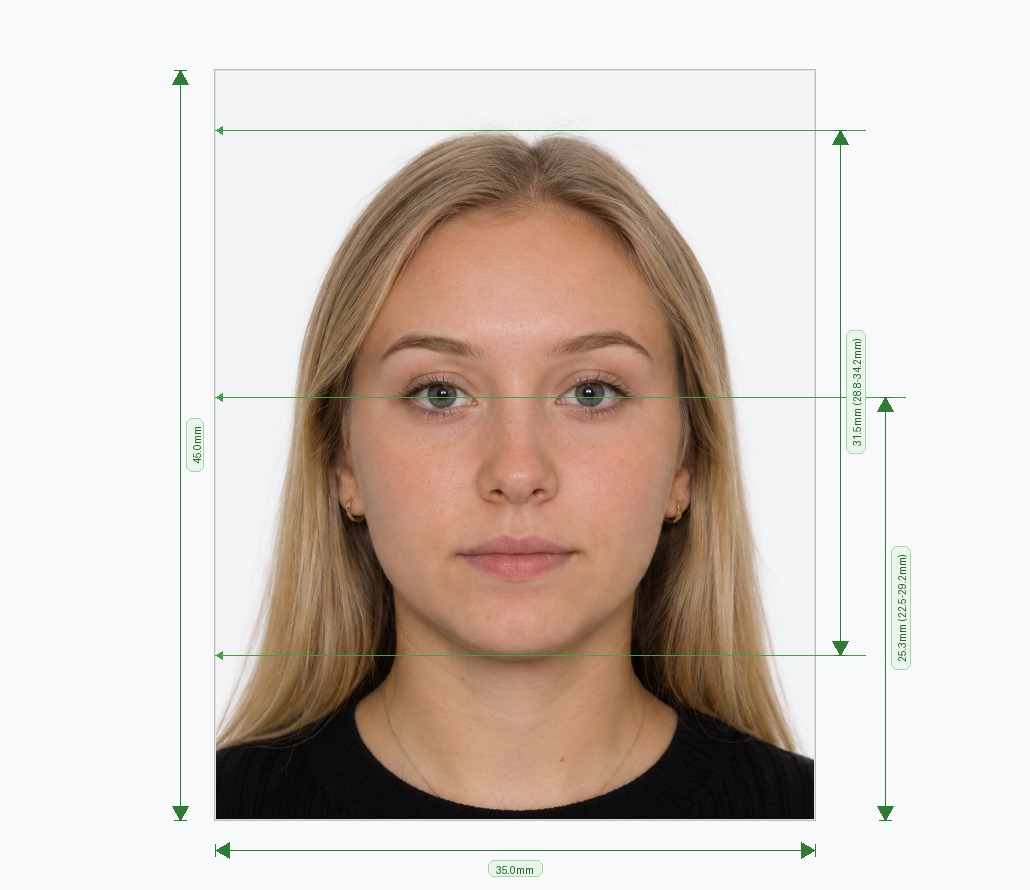
What Is an ICAO Standard Photograph?
In short: an ICAO standard photograph is a passport-style portrait that follows the International Civil Aviation Organization biometric rules (Doc 9303): a plain light background, a neutral expression, open eyes, and a fixed head size, so border and e-gate systems can read your face. It is usually 35 × 45 mm (413 × 531 px at 300 DPI).
The International Civil Aviation Organization (ICAO) sets the global biometric photo standard used by passport authorities, visa offices, and airport identity systems around the world. An ICAO standard photograph follows strict rules for head size, eye position, background color, lighting, and image sharpness so that facial recognition software can read it accurately at border control. Most countries base their national passport photo rules directly on ICAO standards, which is why a photo that meets ICAO specifications is accepted almost everywhere. Our tool builds a fully compliant ICAO standard photograph from any photo you upload, in under a minute, with no design software required.
How to Convert Your Photo to ICAO Standard — 3 Steps
You do not need to understand the technical specifications yourself. The tool applies them for you.
- Choose Your Document: Select the passport, visa, or ID type you need. The tool loads the exact ICAO-based profile for that document, including biometric ratios, background color, and resolution.
- Upload a Photo: Upload an existing photo or take a new one with your phone. JPEG, PNG, and WEBP files up to 15 MB work, from a camera roll, scanner, or gallery.
- Auto-Correct and Download: The tool removes the background, replaces it with the required color, aligns your face to the ICAO grid, and checks lighting and sharpness before you download the finished photo.
ICAO Photo Size and Specifications
These are the measurements an ICAO standard photo is built around. Exact print size and background shade vary by country, so always confirm with the authority that reviews your application.
| Requirement | ICAO-based standard |
|---|---|
| Print size | 35 × 45 mm (most common). ICAO defines proportions, so some countries use another print size, for example 2 × 2 in in the US. |
| Digital size | 413 × 531 px at 300 DPI (35 × 45 mm) |
| Head height (chin to crown) | About 70–80% of photo height, which is 32–36 mm on a 45 mm photo |
| Eye line | Roughly 50–60% of the way up from the bottom edge, with the head centred |
| Resolution | At least about 90 pixels between the centres of the eyes; sharp, in focus, no pixelation |
| Background | Plain, uniform and light (white or light grey). No pattern, texture or shadows |
| Expression | Neutral, mouth closed, both eyes open and looking at the camera |
| Glasses and headwear | No glasses (or no glare and eyes fully visible). No hats or headphones, except religious or medical wear that leaves the full face visible |
| Colour and retouching | Natural colour, no filters, no heavy retouching |
| File format | JPEG for upload, with a print-ready version for 4×6 in sheets |
Source: ICAO Doc 9303 (Part 3) and ISO/IEC 19794-5 face image standard. See the official references below.
Core Requirements of an ICAO Standard Photograph
ICAO photo standards exist to make sure a photo works both for a human officer at a counter and for automated facial recognition at an e-gate. The tool checks every one of these points automatically.
- Head Position and Size: ICAO defines the exact proportion of the frame your head should occupy, measured from chin to crown. The tool uses facial landmark detection to align and crop your photo to this ratio precisely.
- Neutral Background: A plain, evenly lit background — usually white or light grey — is a core ICAO requirement, since shadows or texture can confuse recognition software. The tool removes your original background and replaces it automatically.
- Even, Shadow-Free Lighting: ICAO standards reject photos with shadows on the face or background. The tool detects lighting imbalance and corrects it so the final image is uniformly lit.
- Neutral Expression, Open Eyes: A neutral expression with both eyes open and visible is required under ICAO guidelines. The tool flags photos with closed eyes, tilted heads, or exaggerated expressions so you can retake them if needed.
- Resolution and Sharpness: ICAO sets a minimum resolution and sharpness threshold to keep facial features clearly readable. The tool outputs at the correct pixel dimensions and DPI for print or digital submission.
ICAO Photo Checker: What We Test
Not sure if your current photo passes? Upload it and the ICAO photo checker runs 30+ checks, including head size and position, eye line, background colour and evenness, shadows, lighting balance, sharpness, resolution, expression, and head tilt. You get a clear pass or fail on each point, plus an automatic fix where one is possible. You can also try our visa photo validator or the ICAO compliant photo maker.
Why Is My Photo “Not Valid as per ICAO Standards”?
If an embassy, portal or app rejects your photo for not meeting ICAO standards, one of these is almost always the reason:
| Why it fails ICAO | How to fix it |
|---|---|
| Shadows on the face or background | Face a window, avoid direct sun, stand a little away from the wall |
| Head too small, too large or off-centre | Keep the camera at eye level about 1.5 m away, or let the tool re-crop to the ICAO grid |
| Closed or half-closed eyes, tilted head | Look straight at the lens, keep the head level, retake if needed |
| Glare on glasses | Remove glasses and retake the photo |
| Busy, dark or patterned background | Use a plain wall, or let the tool replace the background |
| Low resolution or heavy compression | Use the original file, not a screenshot or a chat-app copy |
| Smile, open mouth or raised eyebrows | Neutral face, mouth closed |
ICAO Standard Photograph vs Country-Specific Rules
Every member country of the International Civil Aviation Organization builds its national passport and visa photo rules on the same ICAO foundation, then adds small local variations. The United States, the United Kingdom, Schengen countries, India, and most others follow ICAO proportions for head size and expression, but differ slightly on background shade or final print size.
Selecting your destination country in the tool applies the correct local variation on top of the ICAO base standard, so you get a photo that satisfies both the international standard and the specific authority reviewing your application.
| Country / region | Typical print size | Typical background | Page |
|---|---|---|---|
| United Kingdom | 35 × 45 mm | Plain light grey or cream | UK photo requirements |
| United States | 2 × 2 in (51 × 51 mm) | White or off-white | US visa photo editor |
| India | 2 × 2 in (51 × 51 mm) for most passport and visa uses | White | Indian passport size photo |
| Australia | 35 × 45 mm (passport) | Plain white or light | Australian passport checker |
| Germany / Schengen | 35 × 45 mm | Plain light grey or white | Germany photo editor |
| France | 35 × 45 mm | Plain light background | France visa photo guide |
Values are typical and can change. Check the official portal for your country before you submit.
“2 Photos to ICAO Standards”: France and Schengen Forms
French and other Schengen application forms often ask for “2 photos to ICAO standards”. This means two identical, recent photos, usually 35 × 45 mm, with a plain light background, a neutral expression, and a correctly sized head. Create one compliant photo with the tool, then print it twice using our 4×6 passport photo print template. For country details see the France visa requirements guide.
Tips for a Photo That Meets ICAO Standards on the First Try
- Face a window for soft, natural light and avoid direct sun, which creates hard shadows.
- Position the camera at eye level, about 1.5 metres away, to keep facial proportions accurate.
- Keep a neutral expression with your mouth closed and both eyes fully open.
- Remove glasses, hats, and headphones — ICAO standards restrict most items that cover the face.
- Pull hair away from your eyes and the outline of your face.
- Use a plain wall or sheet behind you if possible, so the background removal step has a clean edge to work with.
- Use the original photo file, not a screenshot, so resolution and sharpness stay high.
Official Government References
Verify current photo specifications directly with official international and national government portals:
Frequently Asked Questions
Avoid Passport & Visa Photo Rejections
Our automatic AI tool fixes background shadows, crops to exact millimeter specs (2x2" or 35x45mm), and guarantees 100% biometric compliance.
Create & Fix My Photo Now