Create Your China Passport Photo Online – 33×48mm, Ready in Seconds
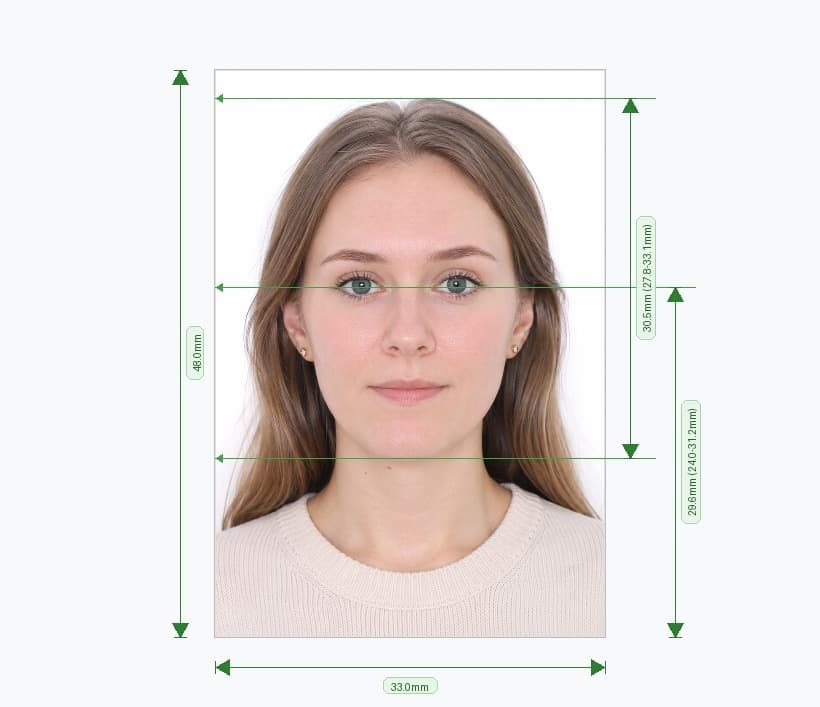
Upload one photo and this tool builds a fully compliant Chinese passport photo automatically. It crops your image to the exact 33mm × 48mm print size the Exit and Entry Administration requires, positions your head inside the official 58%–69% height window, swaps your background for pure white, and exports a print-ready file at 826×1200px, 300 DPI. No studio visit, no measuring, no guesswork.
China's format sits apart from every other country: it is narrower and taller than Europe's 35×45mm standard and has nothing in common with the US 51×51mm size. A photo built for another country will not pass at the counter, which is exactly why this tool builds every photo from scratch around China's own rules.
How the Tool Works
- Upload a photo. Use a recent selfie or a photo taken by a friend — plain background, good light, face forward.
- Let the AI do the measuring. The tool detects your chin, crown, and eye line, then crops to 33×48mm so your head lands inside the 58%–69% range automatically.
- Download and print. Get a digital file plus a print-ready A4 sheet with multiple copies, ready for any photo lab or pharmacy counter.
Official Technical Specifications
| Requirement | Official Value |
|---|---|
| Print size | 33mm × 48mm |
| Digital output | 826 × 1200 px |
| Head height (chin to crown) | 28mm–33mm (58%–69%) |
| Head width | 15mm–22mm |
| Top-of-head to upper edge | 3mm–5mm |
| Chin to lower edge | 7mm or more |
| Resolution | 300 DPI |
| Background | Pure white, no shadow |
| Colour mode | 24-bit RGB, full colour |
| File format | JPEG |
| Issuing authority | Exit and Entry Administration / PSB |
What the Tool Fixes Automatically
- Wrong size or ratio: the tool re-crops every upload to exactly 33×48mm and locks the head into the 58%–69% window using facial-landmark detection, not a manual guess.
- Off-white or textured background: the AI removes your original background completely and replaces it with a verified, shadow-free #FFFFFF.
- Uneven lighting: the tool balances exposure across your face so no shadow forms under the chin or along one cheek — a common reason PSB scans reject a photo.
- Low resolution: every export renders at 300 DPI, so the printed photo stays sharp instead of pixelated.
Check These Before You Upload
The tool handles cropping, background, lighting, and resolution for you. You still control expression, clothing, and accessories, so run through this list before you snap the photo:
- Keep a neutral expression with your mouth closed and both eyes open, looking straight at the camera
- Face the camera directly, without tilting your head
- Keep both ears visible; pin back long hair if it covers them
- Wear dark, plain clothing — white or pale tops blend into the white background
- Remove glasses entirely; Chinese passport photos do not permit them, even prescription lenses, except with a doctor's note for documented medical necessity
- Leave head coverings off unless worn for religious or medical reasons, and keep them clear of your forehead, cheeks, chin, and ears
- Use a photo taken within the last six months that matches your current appearance
Digital File Plus a Print-Ready Sheet
Most in-person applications at the Public Security Bureau still require a physical photo pasted onto the paper form, printed on glossy photo paper — matte, inkjet, and plain paper all get rejected. Every download from this tool includes both the compliant 33×48mm digital file and a print-ready A4 sheet laid out with multiple copies, so one stop at any photo lab or pharmacy print counter covers the requirement.
Frequently Asked Questions
Can I upload a photo I already have, or does it need to be brand new?
Upload any recent photo — within the last six months and matching your current appearance works fine. The tool re-crops and adjusts it regardless of the original size or background.
Will the tool accept a photo taken on my phone?
Yes. Take the photo facing a window for even light, hold the phone at eye level, and stand against any plain wall. Upload it here and the tool removes the background and resizes it to 33×48mm automatically.
Does the output work for both the online application and the paper form?
Yes. Download includes the digital 33×48mm file for any online step and a print-ready A4 sheet for the physical photo the PSB counter requires.
What if my head size falls outside the 58%–69% range after I upload?
That's exactly what the tool corrects. Its landmark detection measures your chin and crown directly and re-crops the frame until your head lands inside the official window, every time.
Can I use a 35×45mm photo from a European application here?
Upload it and the tool rebuilds it from scratch to 33×48mm — reusing a European-sized photo without reprocessing it almost always fails China's stricter head-to-frame ratio.
Why the Tool Beats a Studio Visit
A photo studio measures your head with a ruler and hopes the ratio lands inside 58%–69%. This tool measures your chin, crown, and eye line with the same landmark-detection logic PSB scanners use, so the crop lands inside the compliant zone before you ever leave your house. You skip the appointment, the queue, and the second trip when a studio print comes back wrong.
- No appointment. Upload from your phone whenever your schedule allows.
- No repeat visits. The tool checks compliance before export, so you don't discover a rejected background after paying a print counter.
- Consistent every time. The same landmark algorithm measures every upload identically, unlike a studio photographer working by eye.
What You Get With Every Download
- A 33×48mm digital file at 826×1200px and 300 DPI, ready for any online submission that asks for a digital passport photo
- A print-ready A4 sheet laid out with multiple copies, so one print run at a local lab or pharmacy covers every photo you need
- A compliance check that flags obscured ears, off-white backgrounds, or a head size outside the 58%–69% window before you download anything
One Upload, Every Format You Need
Some applicants need the photo for a first-time passport, others for a renewal, and others for a supporting document alongside a visa or residency application. This tool exports the same 33×48mm specification regardless of which PSB form you're filling in, so one upload covers a first application, a renewal, and a lost-passport replacement without adjusting a single setting. If your local counter later asks for an extra print, the A4 sheet already included in your download holds enough spare copies for that too.