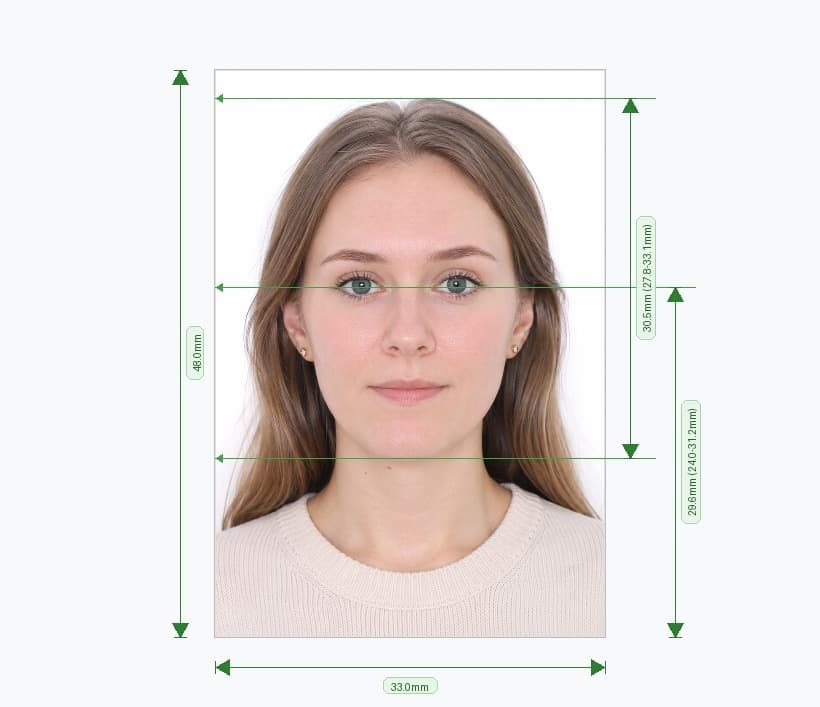
Create Photo for China Visa 33×48mm (3.3×4.8cm) – Online, in Minutes
Upload a photo and this tool builds a China visa photo that clears every COVA upload check on the first try. It crops to the required 33mm × 48mm print size, resizes the digital file to fit the 354–420 × 472–560px window, compresses it into the 40–120KB range, and replaces your background with verified pure white — all four checks the COVA portal runs the moment you upload, handled before you ever touch the visa application.
Every China visa category — tourist (L), business (M), work (Z), student (X), and transit (G) — uses the same 33×48mm format the Ministry of Foreign Affairs set in December 2016. It shares nothing with the 35×45mm European standard or the US 2×2 inch size, so a photo built for another country's visa will not clear COVA's automated scan.
How the Tool Works
- Upload your photo. A recent selfie against any plain wall works — the tool handles the rest.
- The AI measures and crops. Facial-landmark detection locks your chin-to-crown height into the 58%–69% window and crops the frame to exactly 33×48mm.
- Download two files. Get a COVA-ready digital photo sized and compressed to spec, plus a print-ready A4 sheet for your CVASC appointment.
Official Biometric Specifications
| Requirement | Official Value |
|---|---|
| Print size | 33mm × 48mm |
| Digital width | 354–420 px |
| Digital height | 472–560 px |
| File size | 40 KB–120 KB |
| Format | JPEG only |
| Head height (chin to crown) | 28mm–33mm (58%–69%) |
| Head width | 15mm–22mm |
| Background | Pure white |
| Colour | 24-bit RGB, full colour |
The Four Checks COVA Runs on Upload — All Passed Automatically
- File format: the tool always exports JPEG, so a rejected PNG, HEIC, or WebP never reaches the portal.
- Pixel dimensions: output lands between 354–420px wide and 472–560px tall, inside COVA's accepted range every time.
- File size: the tool compresses your export into the 40–120KB band with no tolerance breach at either end.
- Background colour: the AI replaces any wall, cream backdrop, or shadowed background with a verified #FFFFFF that clears COVA's colour check.
Two Files, One Upload
A successful COVA upload does not end the requirement. Applicants still bring one printed 33×48mm photo on glossy paper to the Chinese Visa Application Service Centre (CVASC) appointment. This tool builds both files from the same source image in one export: the COVA-ready digital photo and a print-ready A4 template that any photo lab or pharmacy counter can print before your appointment.
Check These Before You Upload
The tool handles size, resolution, compression, and background. You still control expression, clothing, and accessories:
- Keep a neutral expression, both eyes open, mouth closed, looking directly at the camera
- Centre your head; the tool fits it into the 58%–69% window from there
- Keep both ears fully visible — pin back hair that covers them, since COVA's checker flags this
- Wear clothing that contrasts with white; pale or white tops merge into the background and break edge-detection
- Thin, plain prescription glasses without glare are currently permitted for visa photos, unlike passport photos — but removing them stays the safest choice
- Skip head coverings unless worn for documented religious reasons, and keep them clear of your forehead, cheeks, chin, and ears
- Use a photo taken within the last six months that matches your current appearance
Photographing Children and Infants
Every child needs an individual visa and an individual photo — no parent or guardian in frame. Upload a photo of the child alone against any plain background and the tool applies the same 33×48mm size and 58%–69% head height. Infants under six months can have their eyes closed in the photo; a white or near-white sheet behind a car seat or lap makes a workable background for the initial shot.
Frequently Asked Questions
Why does COVA reject a photo that looks fine on screen?
The usual invisible causes are a file size just outside 40–120KB, pixel dimensions that miss the 354–420 × 472–560px range, or a background with a faint colour cast the portal detects even though it reads as white on screen. This tool checks and corrects all three automatically before you download.
Can I use this tool if I already have a China passport photo?
Yes. The print size matches at 33×48mm, but the rules differ — glasses are conditionally allowed here and banned for passport photos — so upload your source photo again and let the tool build a visa-specific export.
Does the download work for the online COVA upload and the in-person appointment?
Yes. You get a COVA-compliant digital file sized and compressed to spec, plus a print-ready A4 sheet for the CVASC counter, generated from the same upload.
Can I use a smartphone photo instead of a professional one?
Yes. Take it in natural light facing a window, hold the phone at eye level, stand at least 1.5 metres back against a plain wall, then upload it here for automatic background removal, cropping, and compression.
What happens if my head is outside the 58%–69% range in the original photo?
The tool's landmark detection re-crops the frame around your chin and crown until the ratio lands inside the compliant zone, regardless of how the original photo was framed.
Why the Tool Beats Manual Editing
Cropping a photo to 33×48mm in a generic photo editor still leaves the pixel count, file size, and background colour to guesswork, and COVA's four automated checks catch every mismatch. This tool runs your upload through the same size, resolution, and compression bands COVA checks, so the file that leaves this tool is the file COVA accepts.
- No manual resizing. The tool locks pixel dimensions into the 354–420 × 472–560px range automatically.
- No guessing on file size. Compression lands inside 40–120KB without you touching a slider.
- No repeat uploads. A background check flags any colour cast before you submit to COVA, not after a rejection email.
What You Get With Every Download
- A COVA-ready JPEG sized between 354–420 × 472–560px and compressed into the 40–120KB band
- A print-ready A4 sheet with multiple 33×48mm copies for your CVASC appointment
- A pass/fail compliance check across head size, ear visibility, and background colour before you export
One Tool, Every Visa Category
Tourist (L), business (M), work (Z), student (X), and transit (G) visas all use the identical 33×48mm photo standard, so one export from this tool covers whichever category you're applying under. Group applications — a family applying together, for example — can run each person's photo through the tool separately, since COVA requires an individual photo per applicant with no other person in frame.