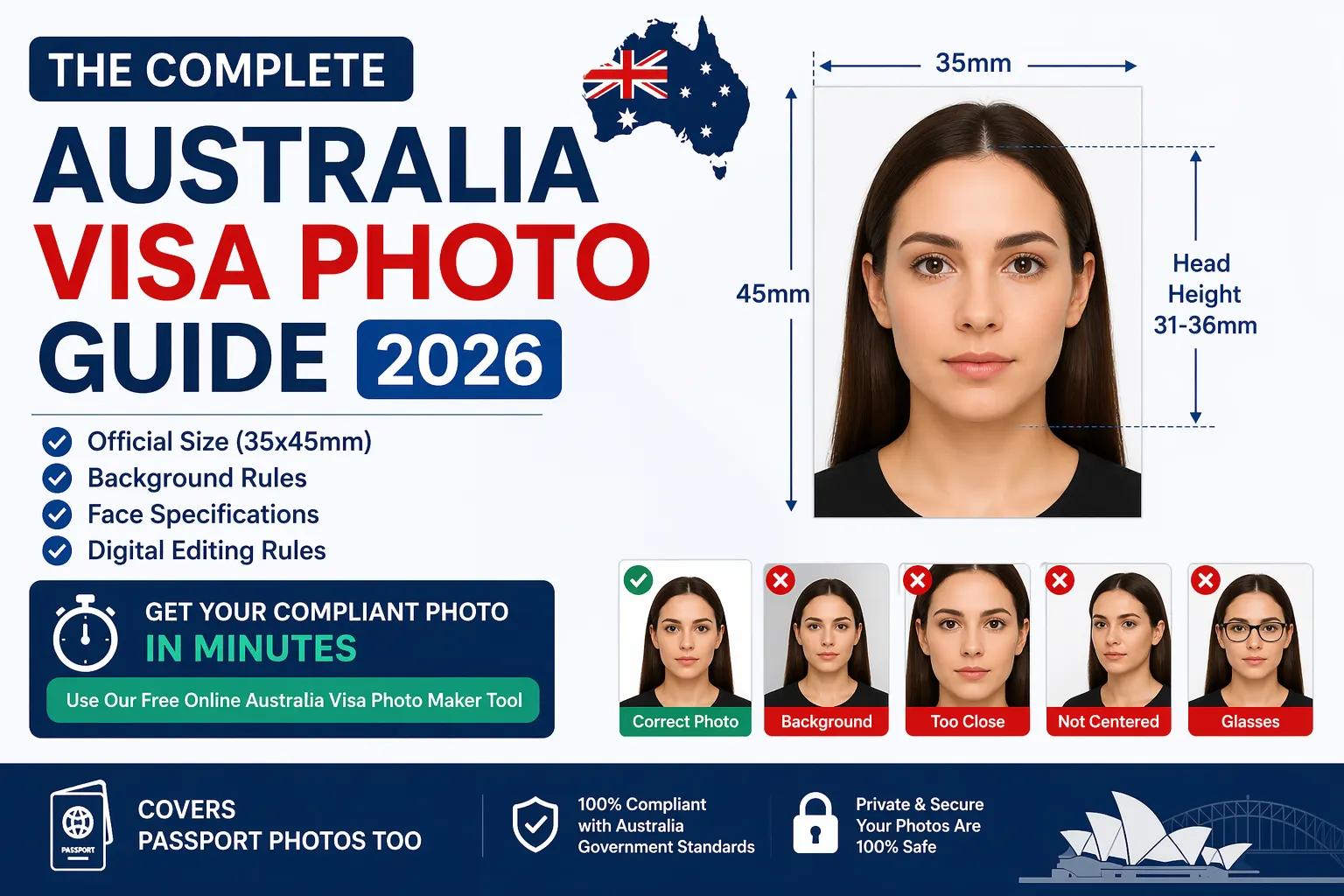
Australia Visa Photo Requirements 2026: The Complete Official Guide
Your Australia visa photo is one of the first things an immigration officer checks — and it's one of the most common reasons applications are delayed or rejected outright. Australia's Department of Home Affairs enforces strict biometric photo standards that are checked both manually and by automated facial recognition software. Even a millimetre out on face height, a faint shadow, or a slightly off-white background can trigger an automatic rejection before your application is even opened.
This guide covers every single Australia visa photo requirement for 2026: dimensions, background rules, face position and expression, editing rules, visa-vs-passport differences, and how to generate a compliant photo online in under two minutes.
On this page
- Official size specifications
- Visa vs. passport photo
- Background requirements
- Face, expression & eyes
- Glasses rules
- Digital editing rules
- Dress code
- Babies & children
- DIY photo, step by step
- Free online maker tool
- Passport photo requirements
- Compliance checker
- Uploading to ImmiAccount
- vs. US/UK/Schengen visas
- Top 10 rejection reasons
- Studio vs. DIY vs. online
- Quick reference table
- FAQ

Who Needs an Australian Visa Photo?
Australia requires visa photos from applicants of most nationalities, though the exact list changes periodically. Citizens of countries such as India, China, Nigeria, Pakistan, Indonesia, Bangladesh, and most of Southeast Asia, the Middle East, and Africa are typically required to apply for a visa before visiting Australia. Even nationalities that enjoy visa-free or eVisitor arrangements — such as the United States, United Kingdom, Canada, and most of Europe — may require a photo for certain long-stay, work, or student visa categories.
If you are applying for any of the following, a compliant photo is required: Tourist Visa (subclass 600), Student Visa (subclass 500), Work and Holiday Visa (subclass 462), Working Holiday Visa (subclass 417), Partner Visa, Skilled Migration Visa, or Australian Citizenship. The same core photo specifications apply across all visa and citizenship categories under the Department of Home Affairs.
Australia Visa Photo Size 2026: The Official Specifications
The Australia visa photo size follows ICAO (International Civil Aviation Organization) biometric standards, enforced uniformly across all Australian visa and passport categories.
| Specification | Requirement |
|---|---|
| Width | 35 mm – 40 mm |
| Height | 45 mm – 50 mm |
| Size in cm | 3.5 cm × 4.5 cm (minimum) |
| Size in inches | ~1.38" × 1.77" |
| Face height (chin to crown) | 32 mm – 36 mm |
| Face coverage | 75–80% of frame |
| Digital resolution | Min 300 DPI; ImmiAccount prefers 1200×1600 px |
| Digital format | JPEG / JPG only |
| Max digital file size | 5000 KB (5 MB) |
| Recency | Taken within the last 6 months |
👉 Get your compliant Australia visa photo in 2 minutes — completely free
Powered by PixPassport
For printed submissions (paper visa applications or passport applications), photos must be printed on professional-grade photo paper using dye-sublimation or equivalent technique — never from a standard inkjet printer at home. Two identical prints are required for most paper-based applications.

Australia Visa Photo Size vs Australia Passport Photo Size: What's the Difference?
This is one of the most frequently asked questions — and the answer surprises many applicants. Australia visa photos and Australia passport photos share the same physical dimensions: 35–40 mm wide by 45–50 mm tall, with face height of 32–36 mm. The differences are in submission and verification:
| Document type | Submission | Background | Editing |
|---|---|---|---|
| Visa (ImmiAccount) | Digital JPEG, no print needed | Plain white or light grey | Crop/resize/background standardisation OK |
| Passport (DFAT) | 2 printed copies, glossy/semi-gloss paper | Plain neutral or light grey | Heavy processing discouraged; use trusted providers |
| Citizenship | Same as visa standard | Neutral / light grey only | No editing permitted — original background required |
Key takeaway: the same photo — if it meets all specifications — can often be used for both visa and passport applications, provided it's recent, printed correctly for passport submission, and meets background requirements. Always confirm with your specific application portal before reusing a photo across document types.
Background Requirements for Australia Visa Photos
Background is the single most frequently failed element in Australian visa and passport photo submissions. The rules are precise and enforced by automated systems:
- Visa applications: Plain white or very light grey background that clearly contrasts with your face and hair.
- Passport applications: Plain neutral or light grey background. Pure white is also accepted.
- Citizenship applications: Neutral or light grey only, and the background must not be artificially removed or replaced — AI background removal is non-compliant here.
- No shadows on the background — stand at least 1 metre from any wall when shooting.
- No patterns, textures, furniture, curtains, or other objects visible behind you.
- Evenly lit — no dark corners, no bright hotspots from flash or overhead lighting.
- No blue, cream, beige, yellow, or any tinted background — these are automatic rejections.
If you're shooting a DIY Australia visa photo at home, stand in front of a plain white or very light grey wall with a window directly in front of you for soft, even natural light. A ring light or two lamps placed symmetrically on either side of your face also works well. Avoid camera flash — it creates harsh shadows and can cause red-eye.

Face Position, Expression, and Eye Requirements
Australian immigration uses ICAO-compliant biometric facial recognition software to process all digital photo submissions, so your face positioning is machine-checked, not just human-reviewed:
- Face position: Centered horizontally and vertically — no off-center tilting.
- Head orientation: Facing directly forward, both ears fully visible and not obscured by hair.
- Expression: Neutral, natural resting face — mouth closed, no smile, no frown, no raised eyebrows.
- Eyes: Open, looking directly at the camera lens.
- Head tilt: Zero tilt permitted — head must be perfectly upright and straight.
- Facial features: Chin, both cheekbones, forehead, both eyes, nose, and mouth fully visible.
- Lighting on face: Uniform frontal illumination, no shadows on nose, chin, neck, or either side.
- Red-eye: Not permitted — avoid flash photography.
- Focus: Sharp and clear — no motion blur, grain, or pixelation.
Watch out for: Australia is notably stricter than many countries on the both-ears-visible rule. Even partial hair covering of one ear can cause a rejection in automated biometric screening — pull hair back or tuck it behind your ears before taking the photo.
Glasses Rules: Can You Wear Glasses in Your Australia Visa Photo?
As of 2026, the Department of Home Affairs strongly discourages glasses in Australian visa and passport photos. For most applicants, removing glasses is the safest approach:
- If you can remove your glasses, you must do so for the photo.
- If you cannot remove glasses for genuine medical reasons, frames must not obscure your eyes and there must be zero lens glare or reflection.
- Tinted lenses, including prescription sunglasses, are not permitted in any case.
- Medical exceptions may require a signed certificate from a registered practitioner with their name, registration number, and practice details.
- Vision impairment or discomfort alone is not an acceptable medical reason to wear glasses in a photo.
Hearing aids are permitted — they do not need to be removed for the photo.
Australia Visa Photo: Digital Editing Rules 2026
One of the most searched questions in 2026 is: "Is digital editing allowed for Australia visa photos?" The answer depends on the application type:
- Visa applications (ImmiAccount): Cropping, resizing, and background standardisation with AI tools is generally accepted, provided the image accurately represents your true appearance.
- Citizenship applications: Photos must be unedited. Do not remove background, moles, wrinkles, scars, or red-eye.
- Passport applications (DFAT): AI-generated or heavily processed images are discouraged; DFAT warns of identity fraud risk with certain online services.
- Never acceptable, regardless of visa type: Smoothing skin, altering facial features, changing eye color, adding digital makeup, generating a synthetic face, or using beauty filters — these constitute fraud and are increasingly caught by biometric screening.
EXIF data is increasingly being reviewed by automated systems. When in doubt, use a reputable Australia visa photo online tool that produces technically compliant output without altering facial features.

Dress Code and Appearance Rules
- Clothing: Everyday clothing is fine. Avoid uniforms or camouflage. Solid colours that contrast with the white/grey background are recommended.
- Makeup: Minimal, natural-looking makeup is permitted. It should not significantly alter your natural appearance.
- Jewelry: Small earrings and a necklace are fine as long as they don't create reflections, cast shadows, or cover any part of your face.
- Glasses: Remove them — see the glasses section above.
- Head coverings (religious): Permitted if worn habitually. Must be plain, show the full face from chin to forehead with both outer eye corners visible, and cast no shadows. Secular hats, caps, and fashion headwear are not permitted.
- Head coverings (medical): Permitted for a medical condition; documentation may be required.
Special Requirements: Australia Visa Photo for Babies and Children
Every applicant — including newborns — requires their own individual photo. Children cannot be included in a parent's photo, and no other person's hands, face, or body should appear in the frame.
- Same 35–40 mm × 45–50 mm dimensions apply to all ages.
- Photographed alone — no parents, carers, toys, pacifiers, or prams visible.
- For infants, eyes do not need to be fully open.
- For infants under ~12 months, an open mouth is acceptable.
- White background still required — a plain white blanket or sheet works as a backdrop.
- Full face must be clearly visible — no profile or tilted-head shots.
Practical tip: lay the baby on a white blanket on a flat surface and photograph from directly above. This creates a natural white background, centers the face, and avoids the shadow problem you get holding an infant upright. Upload the shot to a free online tool to crop and check compliance before submitting.

👉 Get your compliant Australia visa photo in 2 minutes — completely free
Powered by PixPassport
How to Take a DIY Australia Visa Photo at Home: Step-by-Step
You do not need to visit a photo studio to get a compliant Australia visa photo. A modern smartphone and a few minutes of setup are all it takes.
- Find the right background: stand against a plain white or very light grey wall, or hang a white bedsheet flat behind you.
- Control your lighting: face a large window for even natural daylight, or use two lamps of equal brightness on either side of your face.
- Set your distance from the background: stand at least 1 metre away to prevent shadows.
- Set up your camera: use the rear camera at eye level, ideally on a tripod.
- Frame yourself correctly: head, neck, and upper shoulders visible, face centered.
- Prepare your appearance: remove glasses, hats, and heavy jewelry; pull hair back so both ears are visible.
- Set your expression: neutral face, mouth closed, eyes open, looking at the lens.
- Take multiple shots: take 8–10 and pick the sharpest, most evenly lit one.
- Upload to a free tool: crop to the exact 35×45 mm spec and verify compliance before downloading.
Free Australia Visa Photo Maker Tool: Create a Compliant Photo in 2 Minutes
The fastest and most accurate way to get a compliant Australia visa photo online is to use an AI-powered photo tool rather than manually cropping in a general editor:
- Crops your photo to the exact 35×45 mm Australian visa specification.
- Measures and adjusts face height to fall within the 32–36 mm range.
- Replaces non-compliant backgrounds with plain white using AI background removal.
- Checks for shadows, head tilt, closed eyes, and other rejection triggers.
- Outputs a correctly sized JPEG for ImmiAccount digital submission.
- Generates a print-ready sheet for paper-based applications.
👉 Create your free compliant Australia visa photo now: PixPassport – Free Australia Visa Photo Maker Tool


Australia Passport Photo Requirements 2026
Australian passport photo requirements are set by DFAT and align with ICAO biometric standards, nearly identical to visa rules with a few key differences:
- Size: 35–40 mm × 45–50 mm — same as visa photo.
- Face height: 32–36 mm chin to crown — same as visa photo.
- Background: Plain neutral or light grey — slightly different from visa (which accepts white).
- Submission: Two identical printed photos on glossy or semi-gloss paper; standard inkjet printing is not acceptable.
- Source: DFAT recommends professional providers such as Australia Post, and advises caution with online passport photo services due to identity fraud risk.
- Recency: Taken within the past 6 months.
- No glasses: Enforced unless medically exempted.
- Both ears visible: Strictly checked for Australian passports.
Common reasons for Australian passport photo rejection include: incorrect printed dimensions, head size outside the 32–36 mm range, background color issues, subtle shadows under the chin, photos printed on standard copy paper, or any digital manipulation.
Australia Visa Photo Checker: Run a Compliance Check Before You Submit
Before uploading your photo to ImmiAccount, always run it through a dedicated Australia visa photo checker, which scans for:
- Correct dimensions and face height within 32–36 mm.
- Background compliance — white/light grey, shadow-free.
- Face position — centered, forward-facing, no tilt.
- Eyes open and clearly visible.
- No head covering (unless flagged as religious exception).
- Even lighting — no bright or dark patches.
- No glasses glare.
- File size within the 5 MB limit and JPEG format.
Running a pre-submission compliance check takes 30 seconds and can save you the cost and frustration of a rejected application.

How to Upload Your Australia Visa Photo to ImmiAccount
- Log in to your ImmiAccount at immi.homeaffairs.gov.au and navigate to your active application.
- In the photo upload section, select "Upload Photo."
- Your file must be JPEG or JPG, maximum 5 MB.
- The system automatically scans the image with biometric software — out-of-range specs trigger an error.
- If your photo fails the check, retake and re-upload before proceeding.
- Preferred resolution is 1200 × 1600 pixels (~300 DPI at 35×45 mm).
Do not stretch or artificially inflate a low-resolution photo to meet pixel requirements — biometric software flags low-resolution or interpolated images. Always start with a high-resolution original shot.
Australia Visa Photo vs. Schengen, US, and UK Visa Photo: Key Differences
| Country | Size | Background |
|---|---|---|
| Australia | 35×45 mm (rectangular) | White or light grey |
| United States | 2×2 in (51×51 mm, square) | White |
| Schengen area | 35×45 mm | Pure white |
| United Kingdom | 35×45 mm | Light grey or cream |
| Canada | 35×45 mm | White or off-white |
A photo taken for an Australian visa application will often be compliant for Schengen and Canadian visa applications with only minor background adjustments. A US visa photo, being square, will always require a separate crop.
Top 10 Reasons Australian Visa Photos Get Rejected in 2026
- Incorrect dimensions — face height outside the 32–36 mm range is the most common automated rejection trigger.
- Wrong background colour — cream, beige, light blue, or patterned backgrounds are rejected.
- Shadows — even subtle shadows on the background or face trigger automatic flags.
- Glasses glare or reflection — even faint lens reflection fails biometric checks.
- Head not straight — a few degrees of tilt is picked up by biometric software.
- Hair covering ears — both ears must be fully visible.
- Low resolution — blurry, pixelated, or repeatedly re-saved JPEGs.
- Non-neutral expression — any smile, frown, or raised eyebrow can flag.
- Photo older than 6 months — flagged especially if your appearance has changed.
- Wrong file format or size — anything other than JPEG under 5 MB is immediately rejected.
Australia Visa Photo Near Me: Studio vs. DIY vs. Online Tool
| Option | Cost | Time | Best for |
|---|---|---|---|
| Photo studio / chemist | AUD $15–$25 | 30–60 min incl. travel | Paper passport applications |
| DIY smartphone photo | Free | 15–20 min setup | Applicants comfortable setting up lighting |
| Free online maker tool | Free | ~2 min | Online visa applications via ImmiAccount |
Quick Reference: Australia Visa Photo Requirements Summary 2026
| Size | 35–40 mm × 45–50 mm (portrait, not square) |
| Size in cm | 3.5 cm × 4.5 cm |
| Size in inches | ~1.38" × 1.77" |
| Face height | 32–36 mm chin to crown |
| Face coverage | 75–80% of frame |
| Background | Plain white or very light grey, no shadows |
| Expression | Neutral, mouth closed, no smile |
| Eyes | Open, looking at lens |
| Glasses | Remove — not permitted |
| Head tilt | Zero — perfectly upright |
| Both ears | Must be fully visible |
| Recency | Within last 6 months |
| Digital format | JPEG, max 5 MB |
| Digital resolution | Min 300 DPI (prefer 1200×1600 px) |
| Two identical prints, glossy/semi-gloss paper |
Conclusion: Get Your Australia Visa Photo Right the First Time in 2026
The Australia visa photo requirements for 2026 are precise but manageable: 35–40 mm wide by 45–50 mm tall, face height 32–36 mm, plain white or light grey background, no glasses, both ears visible, neutral expression, eyes open, taken within the last 6 months, submitted as a JPEG under 5 MB. Miss any one of these and your application faces delays or outright rejection — often before a human officer even reviews it.
The easiest, fastest, and most cost-effective solution in 2026 is to take a clear smartphone photo at home and process it through a free Australia visa photo maker tool. You get a biometrically accurate, compliant image in minutes — without studio appointments, without queuing, and without cost.
Get your compliant Australia visa photo in 2 minutes — completely free
Powered by PixPassport
Avoid Passport & Visa Photo Rejections
Our automatic AI tool fixes background shadows, crops to exact millimeter specs (2x2" or 35x45mm), and guarantees 100% biometric compliance.
Create & Fix My Photo Now