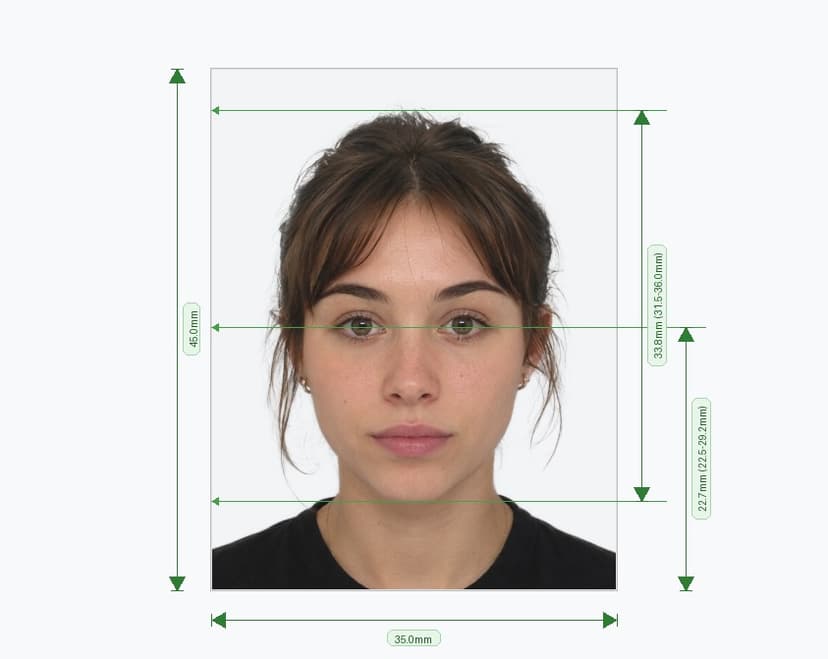
Sri Lanka Visa Photo Requirements (2026)
Applying for a Sri Lanka visa — whether through the Electronic Travel Authorization (ETA) system, a traditional visa application at a Sri Lankan embassy, or visa on arrival at Bandaranaike International Airport (BIA) — requires a compliant passport-style photograph. A non-compliant photo is one of the most common reasons for visa application delays and rejections. This complete guide covers all official Sri Lanka visa photo requirements for 2026 to help ensure your application is accepted the first time.
Photo Size and Dimensions
The Sri Lanka visa photo must measure exactly 35 mm × 45 mm (3.5 cm × 4.5 cm), the same standard biometric size used for the Sri Lanka passport. At 600 DPI, this equals approximately 413 × 531 pixels. Even minor deviations from these dimensions will result in automatic rejection — particularly for online ETA applications where the portal validates image dimensions programmatically. For digital submissions, the file must be in JPEG (JPG) format.
Background Requirements
The background must be plain white or very light-colored — white is the most recommended and universally accepted option. Light grey or cream backgrounds may be acceptable in some cases, but a pure white background eliminates any ambiguity. The background must be completely free of patterns, textures, objects, shadows, and gradients. Any colored, patterned, or busy background will result in immediate rejection. Ensure the background is evenly lit with no shadows cast by the subject behind them.
Face Size and Head Positioning
The face must be fully frontal, centered in the frame, and the head must occupy 70% to 80% of the total image height from the chin to the crown. The top of the shoulders should be visible at the bottom of the frame. The head must be straight — not tilted to either side, turned, or angled in any direction. Both ears should be visible. The full face from chin to forehead must appear within the frame with no cropping at any edge.
Facial Expression and Eyes
Maintain a neutral, relaxed facial expression — mouth closed, no smiling, no frowning, no raised or furrowed eyebrows. Both eyes must be fully open and looking directly at the camera. Eyebrows must not be raised or squinted. Red-eye in photos is not permitted; use appropriate lighting or red-eye correction during the shoot rather than digital post-processing. The face must be sharp, in focus, and clearly visible without any obstruction from hair, accessories, or shadows.
Photo Quality and Technical Specifications
The visa photo must be in full color — black-and-white images are not accepted. The image must be sharp, properly exposed, and free from pixelation, blur, or graininess. No digital filters, retouching, beauty enhancements, or color corrections are permitted. Lighting must be uniform across the entire face with no hot spots, harsh shadows, or uneven exposure. Natural skin tones must be accurately represented — over- or under-exposed skin tones will lead to rejection. For ETA online submissions, the file must be in JPEG format; file size requirements follow the ETA portal's validation rules, so ensure the image is high quality while staying within the upload limit. For physical visa applications at embassies or consulates, use professional-grade glossy or matte photo paper printed at an authorized photo studio.
Clothing and Accessories
Wear everyday clothing that clearly contrasts with the white background — avoid all-white or very light-colored tops as they can blend into the background and create compliance issues. Uniforms or clothing resembling military, official, or government attire are not permitted. Spectacles and glasses are strongly discouraged and should be removed for the photo. Sunglasses and tinted glasses are strictly prohibited under all circumstances. Head coverings are generally not permitted, with the exception of those worn for genuine religious reasons — in such cases, the full face from chin to forehead must remain clearly and fully visible with no shadows cast on the face. Avoid wearing heavy jewelry or large accessories that draw attention away from the face or cast shadows.
Sri Lanka ETA — Digital Photo Guidelines
The Sri Lanka Electronic Travel Authorization (ETA) is the primary visa pathway for most visitors in 2026 and is applied for online through the official Department of Immigration and Emigration portal. The ETA application requires uploading a passport-style color photograph in JPG format with a white background, neutral expression, and no glasses. The photo must accurately represent your current appearance. Poor quality photos or photos that do not meet the technical specifications are a leading cause of ETA processing delays. It is strongly recommended to have your photo professionally prepared and verified against the official requirements before uploading.
Photo Recency
All visa photos — whether for ETA, embassy applications, or visa on arrival — must have been taken within the last six months of the application or travel date. Photos older than six months will not be accepted. The photo must accurately reflect your current appearance, including current hair, any facial features, or significant changes in appearance since the photo was taken.
Children and Infants
Each child traveling to Sri Lanka, including newborns, must have their own individual visa application with a separate, individual photograph. The photo must show only the child — no hands, toys, car seats, supporting adults, or other objects should be visible. For infants, the same technical specifications apply; closed eyes may be tolerated for very young infants but open eyes are always preferred. The child's full face must be visible and centered in the frame.
Common Reasons for Sri Lanka Visa Photo Rejection
The most frequent reasons visa photos are rejected include: colored or patterned background, photo taken more than six months ago, wearing sunglasses or tinted glasses, digital editing or filters applied, shadows on the face or background, incorrect head-to-frame ratio, non-JPEG file format for online submissions, poor image resolution, smiling or non-neutral expression, and head tilted or turned away from the camera.
Quick Compliance Checklist
Before submitting your Sri Lanka visa application, verify the following: ✔ Photo size is exactly 35 × 45 mm ✔ Background is plain white or very light ✔ Head occupies 70–80% of image height ✔ Face is centered, straight, and fully visible ✔ Both eyes open, no red-eye ✔ Neutral expression, mouth closed ✔ No glasses, sunglasses, or non-religious head coverings ✔ Full color, no digital retouching or filters ✔ Photo taken within the last 6 months ✔ JPEG format for online ETA submission ✔ Clothing contrasts with the white background