Create Your Russia Visa Photo Online — 35×45mm, E-visa and Consulate Ready
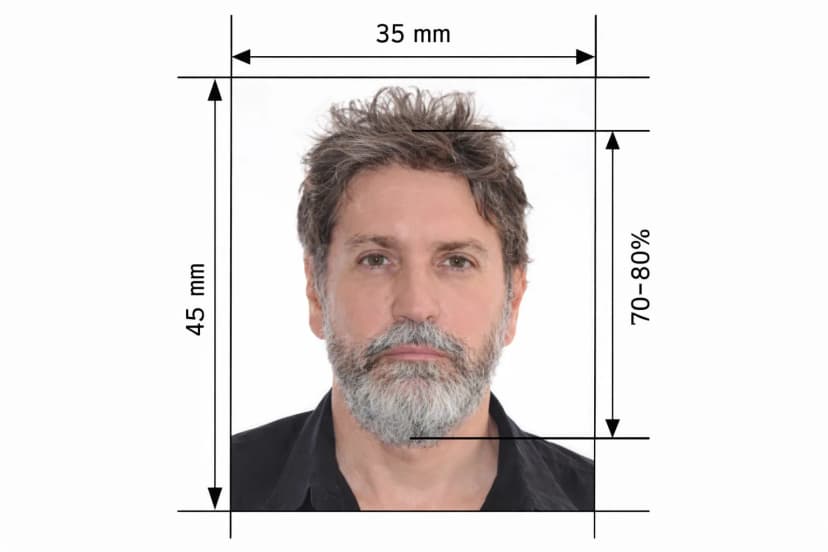
Upload a photo and this tool builds a Russian visa photo that clears both the Unified E-visa portal and consulate counter checks on the first attempt. It crops to the required 35mm × 45mm size, positions your head inside the 71%–80% frame-height window, swaps your background for perfectly white, and exports a sharp 413×531px JPEG with no compression artifacts — exactly what the Ministry of Foreign Affairs' automated validator scans for.
One of the most common causes of Russian visa delays is a casual or "vacation-style" photo with a non-white background. This tool builds a studio-standard biometric photo from any smartphone shot, so tourist, business, and E-visa applications all clear pre-check without a second try.
How the Tool Works
- Upload your photo. A recent, well-lit photo against a plain wall gives the AI what it needs.
- The AI measures and crops. Landmark detection builds the 35×45mm frame around your face so head height lands between 32mm and 36mm — the 71%–80% target.
- Download and submit. Get a sharp JPEG sized for E-visa digital upload plus a print-ready A4 sheet for sticker-visa consulate submission.
Russia Visa Photo — 2026 Biometric Targets
What the Tool Fixes Automatically
- Non-white background: the AI replaces any wall, backdrop, or shadow with verified pure white — even a slight grey tint fails the E-visa validator.
- Wrong head scale: the tool locks head height into 32mm–36mm and centres the face automatically.
- Compression artifacts: exports stay sharp and clean so the JPEG passes the portal's clarity check.
- Non-neutral extras: the tool crops tight to the compliant frame, keeping large jewellery or hats out of the "biometric neutrality" zone the portal flags.
Check These Before You Upload
The tool handles size, background, and sharpness. You still control expression, clothing, and accessories:
- Keep eyes open and mouth firmly closed, with a neutral expression throughout
- Face the camera directly for a full frontal view
- Wear formal or smart-casual attire in dark colours — black, navy, or dark grey contrast best against white
- Remove glasses for the fastest processing; if you keep them on, make sure there's no glare and the frames don't hide your eyes
- Skip large jewellery and hats unless worn for religious reasons, and keep hair clear of your eyes
- Use a photo taken within 6 months of your application date
One Tool, Every Russia Visa Category
Tourist, business, and transit sticker visas, along with the Unified E-visa, all use the identical 35×45mm and 71%–80% head-coverage standard. One export from this tool works whether you're uploading to the E-visa portal or handing a printed photo to a consulate or visa centre.
Digital File Plus a Print-Ready Sheet
E-visa applications need a clean digital JPEG upload, while sticker-visa applications at a consulate or visa centre still require a printed photo. Every download from this tool includes both, built from the same source image, so either route is covered.
Frequently Asked Questions
Why does the E-visa portal reject a photo that looks fine on screen?
The usual invisible causes are a background with a faint grey or cream tint, a head-height ratio just outside 71%–80%, or JPEG compression artifacts the validator flags. This tool checks and corrects all three before export.
Can I wear glasses in my Russia visa photo?
You can if there's no glare and the frames don't hide your eyes, but the Consular Department recommends removing them entirely for the fastest processing.
Does the same photo work for a sticker visa and the E-visa?
Yes. Both use the identical 35×45mm size and 71%–80% head-coverage standard — download the digital file for E-visa upload and the print sheet for a sticker-visa appointment.
What counts as a non-compliant "vacation-style" photo?
Any photo with a colored or textured background, a casual pose, or visible shoulders cropped unevenly. Upload it here and the tool rebuilds it into a studio-standard biometric frame.
Can I use a photo from another country's visa application?
Upload it and the tool re-crops it from scratch to 35×45mm — reusing a photo sized for another country's ratio rarely lands inside Russia's 71%–80% window without reprocessing.
Expedited Russian Visa Approval
This AI tool generates 35×45mm photos that meet MID RF's biometric targets for E-visa and sticker-visa applications, giving you a guaranteed compliant image for 2026 submissions.