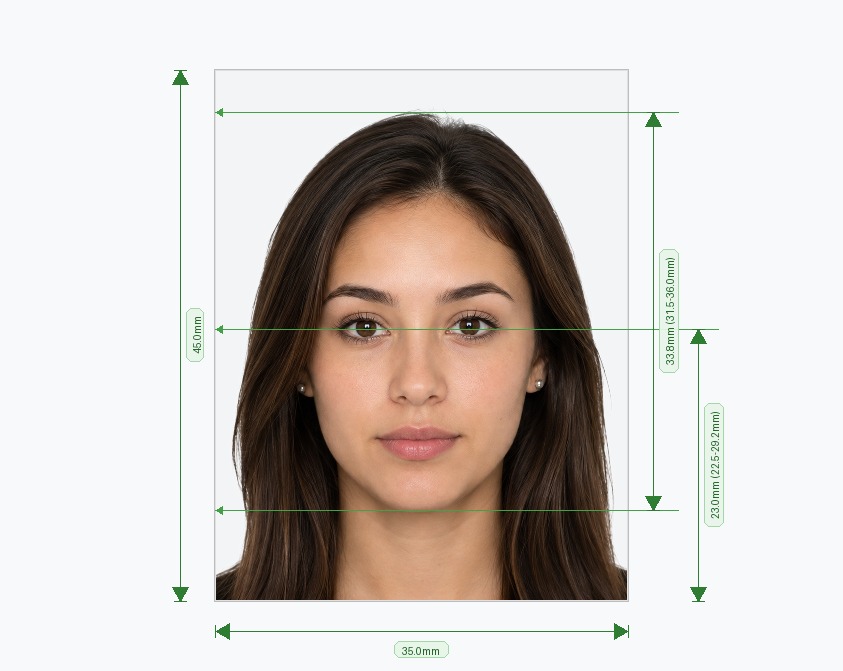
What Is an ICAO Compliant Photo?
An ICAO compliant photo follows the biometric specifications set by the International Civil Aviation Organization, the UN body that defines global standards for passports, visas, and travel documents. Governments and airports rely on these rules because they let facial recognition software read your photo instantly, without a human reviewer double-checking every application. When a photo misses the mark on head size, background color, or lighting, the result is usually the same: a rejected application, a wasted trip to the photo studio, and a delayed passport or visa. Our free tool builds an ICAO compliant photo from any picture you already have, checking it against the same rules an immigration officer or e-passport scanner would use.
How to Create an ICAO Compliant Photo in Minutes
- Upload a Photo: Stand facing a window or soft natural light, look straight ahead, and take a photo on your phone. Upload it to the tool — no studio visit required.
- Run the AI Check: The tool scans background purity, head height, eye position, and lighting balance, then flags anything that falls outside ICAO photo standards.
- Download Your File: Get a high-resolution, watermark-free image sized correctly for your destination country, plus a ready-to-print sheet if you need a physical copy.
Core ICAO Photo Standards You Need to Meet
These rules apply whether you're applying for a passport, visa, or national ID, and they form the baseline for almost every icao standard photograph requirement worldwide.
- Head Coverage: Your face should measure 32mm to 36mm from chin to the top of your hair, centered in the frame.
- Neutral Expression: Keep your mouth closed, avoid smiling or frowning, and look directly into the camera.
- Even Lighting: Light your face and background evenly, with no harsh shadows, glare, or hotspots.
- Clean Background: Use a solid white or light grey backdrop with uniform color and no texture.
- Sharp Resolution: Submit a high-resolution image so biometric scanners can read facial features clearly.
- No Accessories: Remove glasses, hats, and headphones unless you wear them daily for religious or medical reasons.
Common Mistakes That Get an ICAO Photo Rejected
Most rejections come down to a handful of avoidable errors. Watch out for these before you submit your photo:
- Taking the photo indoors under yellow or dim lighting, which throws off the color balance.
- Cropping too tight or too loose, so the head-height ratio falls outside the allowed range.
- Using a shadowed wall or patterned background instead of a plain, evenly lit one.
- Wearing a big smile or tilting the head, both of which count as a non-neutral expression.
- Uploading a low-resolution image that blurs when printed or scanned.
Our tool catches each of these automatically, so you fix the issue before you print or submit anything.
Why Use an Online Tool Instead of a Photo Studio?
A photo studio can produce a compliant image, but it costs time and money, and staff don't always know the exact rules for every country. Our tool applies the same ICAO photo standards instantly, adjusts your image automatically, and lets you download the result in seconds. You also get a digital file you can reuse for visa renewals or other applications, not just a single printed copy.
Frequently Asked Questions
Avoid Passport & Visa Photo Rejections
Our automatic AI tool fixes background shadows, crops to exact millimeter specs (2x2" or 35x45mm), and guarantees 100% biometric compliance.
Create & Fix My Photo Now