UK Digital Passport Photo: How to Take & Submit Online (2026)
If you're applying for a British passport through the online service, you'll need a UK digital passport photo rather than a printed one. HM Passport Office (HMPO) only accepts digital photos for online applications, and the file has to pass a specific set of technical and presentation rules before your application can move forward. This guide pulls the requirements straight from gov.uk so you know exactly what "compliant" looks like before you upload anything.
What Counts as a UK Digital Passport Photo?
A UK digital passport photo is the JPEG image you upload when you renew or apply for a passport through the gov.uk online service. It's different from the printed 45mm × 35mm photo used on paper applications — there's no millimetre measurement to worry about, but the pixel dimensions, file size, and image quality all have to meet HMPO's published standards under gov.uk digital passport photo rules.
UK Digital Passport Photo Requirements (Official HMPO Rules)
According to gov.uk, every digital photo submitted with an online passport application must meet these UK digital passport photo requirements:
- At least 413 pixels wide and 531 pixels tall
- Between 50KB and 10MB in file size
- Clear, in focus, and in colour
- Unaltered by computer software or filters
- Taken within the last month
- Shot against a plain, light-coloured background with clear contrast between you and the background
- Free of "red eye," shadows on your face or behind you, and any other people or objects in frame
On top of the technical checks, these British digital photo requirements also cover how you appear in the shot. You must be facing forward and looking straight at the camera, have a neutral expression with your mouth closed, keep both eyes open and visible, and avoid hair falling across your eyes. Head coverings aren't permitted unless worn for religious or medical reasons, and glasses should be left off unless you need them — if you do wear them, the lenses must be clear with no glare, reflection, or frame shadow over your eyes.
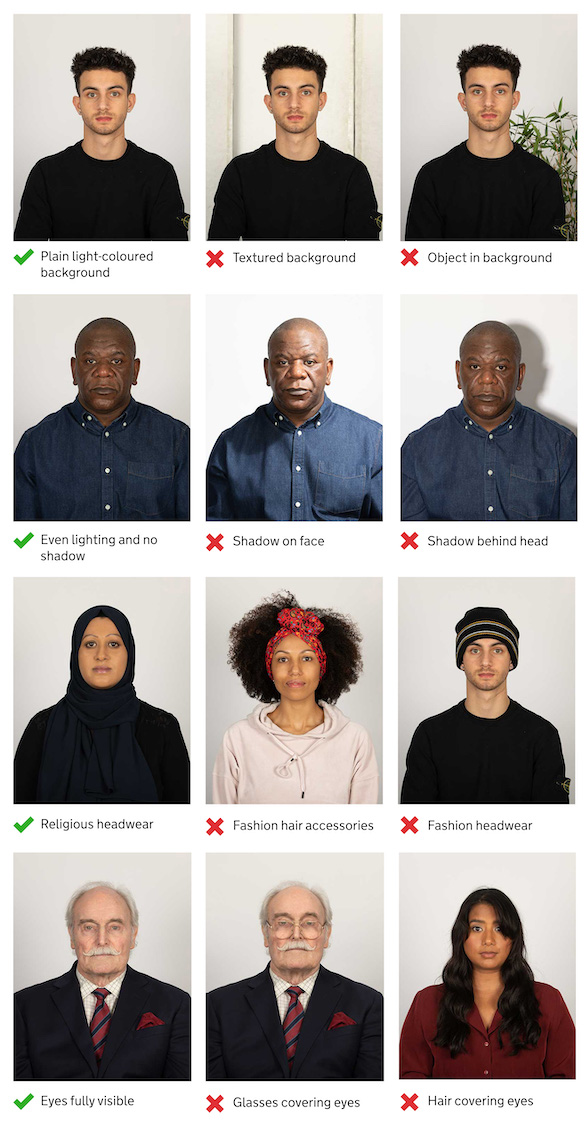
Official HMPO digital photo example. Source: gov.uk
Digital vs Printed: Quick Comparison
| Feature | Digital Photo (Online) | Printed Photo (Paper Form) |
|---|---|---|
| Minimum size | 413 × 531 px | 45mm high × 35mm wide |
| File rules | JPEG, 50KB–10MB | Glossy/matte paper, no border, no creases |
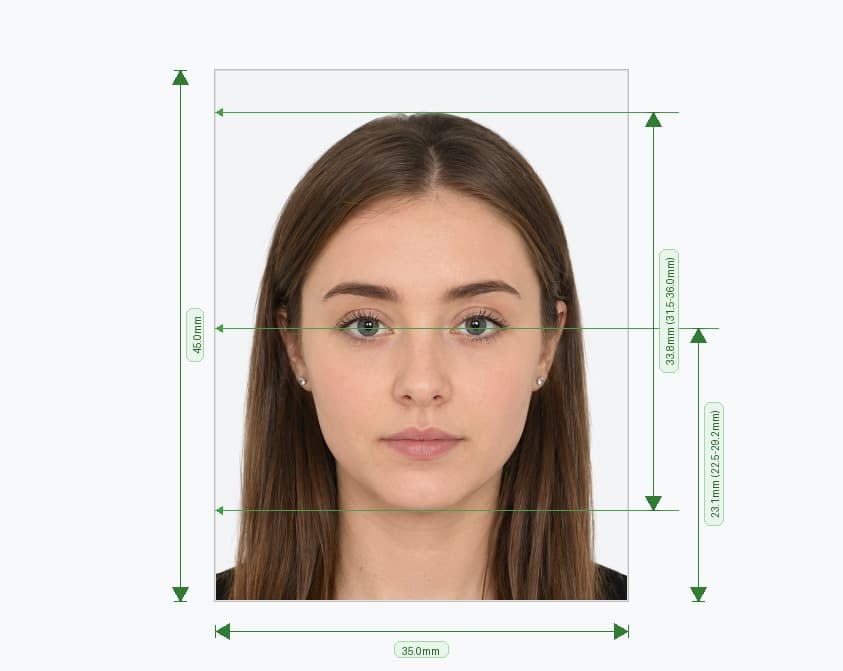
| Head height | Cropped automatically by the system | 29mm–34mm, crown to chin |
| Background | Plain, light-coloured | Plain cream or light grey |
| Quantity | 1 digital upload | 2 identical prints |
How to Take Your Own UK Digital Passport Photo at Home
You can take the photo yourself on a phone or camera during the online application, though gov.uk notes that photos from a booth or shop are more likely to be approved than ones taken on your own device. If you're doing it yourself:
- Stand facing a plain, light-coloured wall in even, natural light — avoid harsh overhead lighting that casts shadows
- Ask someone else to take the photo for you; HMPO requires help from another person for self-submitted shots
- Include your head, shoulders, and upper body in the frame — don't pre-crop the image, as the system crops it for you
- Remove hats, scarves, or headphones unless worn for religious or medical reasons
- Keep a neutral expression, mouth closed, eyes open and clearly visible
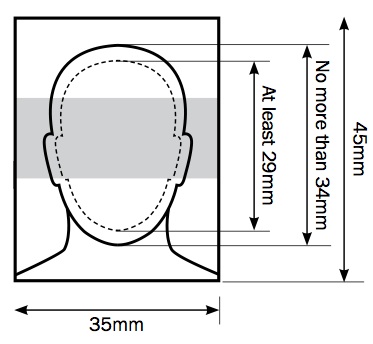
HMPO framing guidance for head, shoulders, and upper body. Source: gov.uk
Two Ways to Get a Compliant Digital Photo
Option 1: Photo Code From a Booth or Shop
Before starting your application, visit a photo booth or shop and choose the option to receive a code with your prints. You'll enter that code during your passport application, and the digital photo on file is added automatically.
Option 2: Upload a Photo From Your Own Device
If you'd rather skip the shop, you can take and upload a photo directly during the application. The gov.uk online service runs an automated check on the image as part of the UK passport digital photo checker process built into the application itself, flagging anything that doesn't meet the rules above so you can retake it before submitting.
Digital Photo Rules for Babies and Children
- Children must be photographed alone, with no toys or dummies in shot
- Children under 6 don't need to look directly at the camera or hold a plain expression
- Babies under 1 don't need their eyes open; a hand can support their head as long as it's out of frame
- Babies under 1 should lie on a plain, light-coloured sheet, photographed from above
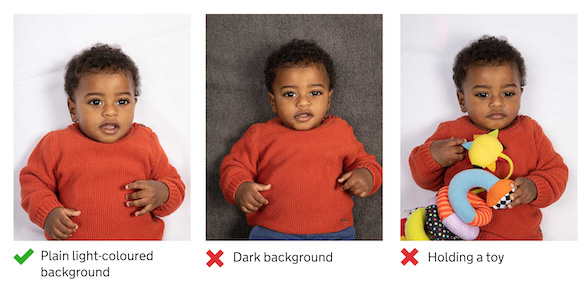
Official HMPO digital photo example for children. Source: gov.uk
Common Reasons UK Digital Photos Get Rejected
- Image below the 413 × 531 px pixel minimum or too heavily compressed
- Background that isn't plain or light-coloured (patterned, dark, or cluttered)
- Shadows across the face or behind the subject
- Glare or reflection on glasses lenses, or frames covering the eyes
- Smiling, an open mouth, or a non-neutral expression
- Photo older than one month
- Head covering not worn for religious or medical reasons
FAQs
Can I use a selfie for my UK digital passport photo?
Yes — gov.uk allows photos taken on your own device during the application, though it notes booth or shop photos are more likely to be approved on the first try.
What's the minimum pixel size for a UK digital passport photo?
413 pixels wide by 531 pixels tall, as a JPEG between 50KB and 10MB.
Do I need to crop the photo myself before uploading?
No. Include your head, shoulders, and upper body, and gov.uk's system handles the cropping automatically.
How recent does the photo need to be?
It must have been taken within the last month, even if your appearance hasn't changed.
Check Your UK Digital Passport Photo Before You Upload
Verify your photo against HMPO's 2026 digital rules: 413 × 531 px minimum, plain light background, no red-eye, correct framing — before it slows down your gov.uk application.
Powered by PixPassport
Expert Q&A
Avoid Common Rejections Instantly
We ensure your photo meets 2026 biometric standards: perfect 600x600 size, correct head ratio, and pure white background.
Fix My Photo Now