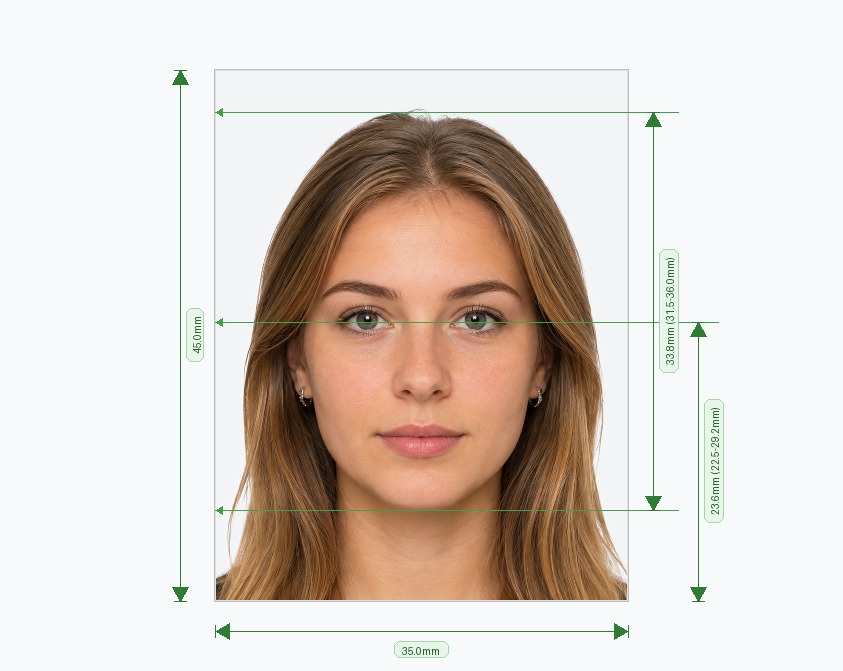
Create an ICAO Standard Photo Online — Fast & Guaranteed
An ICAO standard photo is required for biometric passports, national IDs, and visa applications across more than 190 countries. The International Civil Aviation Organization establishes strict technical rules for facial alignment, head height ratio, lighting, contrast, and background uniformity to ensure effortless automatic face recognition at border control e-gates. Our online tool turns any smartphone picture or digital camera photo into an official ICAO standard photo in under two minutes, with no editing software or photography background required.
How to Make an ICAO Standard Photo Online — 3 Easy Steps
Generating a compliant ICAO standard photo is simple and automated:
- Select Document & Country: Choose your document type (passport, visa, or identity card). The tool automatically loads the corresponding ICAO biometric standards.
- Upload Your Image: Snap a fresh photo or upload an existing photo from your phone or computer. Ensure your face is centered and fully visible.
- Download Your Compliant Photo: Our AI instantly removes the original background, sets the required background color, crops to standard biometric proportions, and validates compliance before you download.
Key Specifications of an ICAO Standard Photo
Biometric passport systems require exact photographic parameters. Our automated editor verifies all of the following parameters automatically:
- Standard Size: 35mm × 45mm (or 2×2 inches depending on regional specifications).
- Facial Proportion: Your head (from chin to crown) must occupy 70% to 80% of the overall frame height (32mm to 36mm).
- Background: Plain, light-colored background (white, off-white, or light grey) without shadows, patterns, or objects.
- Position & Expression: Head centered facing forward, neutral facial expression, mouth closed, and both eyes clearly visible.
- Image Resolution: Minimum 600 DPI for physical printing or exact high-resolution pixel dimensions for digital portal submissions.
Frequently Asked Questions
Avoid Passport & Visa Photo Rejections
Our automatic AI tool fixes background shadows, crops to exact millimeter specs (2x2" or 35x45mm), and guarantees 100% biometric compliance.
Create & Fix My Photo Now